blogger templates blogger widgets
Showing posts with label jax-rs. Show all posts
This is part of a list of blog posts.
To browse the contents go to

JAX-RS: Sending/Receiving objects

Note that all primitive datatypes are converted to Wrapper classes. So all we need to discuss is how to send as a response or request to a REST application without doing any custom string/json/xml conversion.

First let's write a service that returns integer as string.
@Path("/hello")
public class HelloResource {
 private static String[] response = { "apple", "banana", "mango" };

 @Path("/fruit")
 @POST
 public String getFruit(String index) {
  System.out.println(index);
  return response[Integer.parseInt(index) % 3];
 }
}

Client code,
String lsUrl = "http://localhost:9080/RSServer/HelloApp/hello/fruit";
RestClient client = new RestClient();
Resource resource = client.resource(lsUrl);
ClientResponse result = resource.contentType(MediaType.TEXT_PLAIN).post("1");
System.out.println(result.getEntity(String.class));

Output:
1
banana


Let's now try to return Integer.

@Path("/hello")
public class HelloResource {
 private static String[] response = { "apple", "banana", "mango" };
 
 @Path("/fruit")
 @POST
 public Integer getFruit(int index) {
  System.out.println(index);
  return response[index % 3];
 }
}

Client code,
String lsUrl = "http://localhost:9080/RSServer/HelloApp/hello/fruit";
RestClient client = new RestClient();
Resource resource = client.resource(lsUrl);
//ClientResponse result = resource.contentType(MediaType.TEXT_PLAIN).post(1);
// cannot do like this
//java.lang.RuntimeException: A javax.ws.rs.ext.MessageBodyWriter implementation was not found for the class java.lang.Integer type and text/plain media type.

Couldn't find a workaround for this using Wink/IBM implementation but there seems to be a way to do it using jersy as explained here

Another approach is to represent a mime type corresponding to your data and create custom entity providers.
By adding a custom entity provider, you can de-serialize custom Java types from message bodies and serialize any media type as message bodies.

Let's say you have object of class MyObject.

import java.io.Serializable;

public class MyObject implements Serializable {
 public static final String MIME_TYPE = "application/myType";

 private int index;

 public MyObject() {
 }

 public MyObject(int index) {
  this.index = index;
 }

 public int getIndex() {
  return index;
 }

 public void setIndex(int index) {
  this.index = index;
 }
}

import java.io.IOException;
import java.io.InputStream;
import java.io.ObjectInputStream;
import java.lang.annotation.Annotation;
import java.lang.reflect.Type;

import javax.ws.rs.Consumes;
import javax.ws.rs.WebApplicationException;
import javax.ws.rs.core.MediaType;
import javax.ws.rs.core.MultivaluedMap;
import javax.ws.rs.ext.MessageBodyReader;
import javax.ws.rs.ext.Provider;

@Provider
@Consumes(MyObject.MIME_TYPE)
public class MyReader implements MessageBodyReader<myobject> {

 @Override
 public boolean isReadable(Class<?> type, Type type1, Annotation[] antns,
   MediaType mt) {
  return MyObject.class.isAssignableFrom(type);
 }

 @Override
 public MyObject readFrom(Class<myobject> type, Type type1,
   Annotation[] antns, MediaType mt,
   MultivaluedMap<String, String> mm, InputStream in)
   throws IOException, WebApplicationException {
  try {
   ObjectInputStream ois = new ObjectInputStream(in);
   return (MyObject) ois.readObject();
  } catch (ClassNotFoundException ex) {
   ex.printStackTrace();
  }
  return null;
 }
}

import java.io.IOException;
import java.io.ObjectOutputStream;
import java.io.OutputStream;
import java.lang.annotation.Annotation;
import java.lang.reflect.Type;

import javax.ws.rs.Produces;
import javax.ws.rs.WebApplicationException;
import javax.ws.rs.core.MediaType;
import javax.ws.rs.core.MultivaluedMap;
import javax.ws.rs.ext.MessageBodyWriter;
import javax.ws.rs.ext.Provider;

@Provider
@Produces(MyObject.MIME_TYPE)
public class MyWriter implements MessageBodyWriter<myobject> {

 @Override
 public boolean isWriteable(Class<?> type, Type type1, Annotation[] antns,
   MediaType mt) {
  return MyObject.class.isAssignableFrom(type);
 }

 @Override
 public long getSize(MyObject t, Class<?> type, Type type1,
   Annotation[] antns, MediaType mt) {
  // As of JAX-RS 2.0, the method has been deprecated and the
  // value returned by the method is ignored by a JAX-RS runtime.
  // All MessageBodyWriter implementations are advised to return -1 from
  // the method.

  return -1;
 }

 @Override
 public void writeTo(MyObject t, Class<?> type, Type type1,
   Annotation[] antns, MediaType mt,
   MultivaluedMap<String, Object> mm, OutputStream out)
   throws IOException, WebApplicationException {
  ObjectOutputStream oos = new ObjectOutputStream(out);
  oos.writeObject(t);
 }
}


Client code,
//note that client needs access to Writer and Reader classes.
ClientConfig clientConfig = new ClientConfig();
Application app = new javax.ws.rs.core.Application() {
 public Set<Class<?>> getClasses() {
  Set<Class<?>> classes = new HashSet<Class<?>>();
  classes.add(MyReader.class);
  classes.add(MyWriter.class);
  return classes;
 }
};
clientConfig.applications(app);

String lsUrl = "http://localhost:9080/RSServer/HelloApp/hello/fruit";
RestClient client = new RestClient(clientConfig);
Resource resource = client.resource(lsUrl);
String result = resource.contentType(MyObject.MIME_TYPE).post(
  String.class, new MyObject(1));
System.out.println(result);

JAX-RS: Sending XML data


Instead of transforming XML to and from native Java types in a tedious manner, you can leverage the advantages of using JAXB objects. Even though you can use the javax.xml.transform.Source, java.io.InputStream, or java.lang.String interfaces or even a simple byte array to store the XML either as a request or response entity, JAXB enables easier data binding

import javax.xml.bind.annotation.XmlRootElement;
import javax.xml.bind.annotation.XmlType;

@XmlRootElement(name="note")
@XmlType
public class Note {

    private Long id;
    private String text;

    public Note() {
    }

    public Note(Long id, String text) {
        this.id = id;
        this.text = text;
    }

    public Long getId() {
        return id;
    }

    public void setId(Long id) {
        this.id = id;
    }

    public String getText() {
        return text;
    }

    public void setText(String text) {
        this.text = text;
    }

}

import javax.xml.bind.annotation.XmlElement;
import javax.xml.bind.annotation.XmlRootElement;
import javax.xml.bind.annotation.XmlTransient;

@XmlRootElement(name="notes")
public class NotesList {

    @XmlElement(name="note")
    private List<note> notes = new ArrayList<note>();

    public NotesList() {
    }

    @XmlTransient
    public List getNotes() {
        return notes;
    }

    public void setNotes(List notes) {
        this.notes = notes;
    }
}


@Path("/hello")
public class HelloResource {

    @Path("/notes")
    @GET
    public NotesList list() {
        List listOfNotes = new ArrayList();
        listOfNotes.add(new Note(1L,"one"));
        listOfNotes.add(new Note(2L,"two"));
        NotesList response = new NotesList();
        response.getNotes().addAll(listOfNotes);
        return response;
    }
}

You could write a client or test it using a tool like Advanced Rest client chrome extension.


By default, the JAX-RS runtime environment attempts to create and use a default JAXBContext class for JAXB classes. However, if the default JAXBContext class is not suitable, then you can supply a JAXBContext class for the application using a JAX-RS ContextResolver provider interface.

This scenario might occur because of complexities of the JAXB classes for the application. You must add the @Provider annotation to the class; for example:

//below example from IBM knowledge center
@Provider
public class MyContextResolver implements ContextResolver<jaxbcontext> {
     public JAXBContext getContext(Class<?> aType) {
         if(aType == Book.class) {
             JAXBContext myContext = /* This statement creates create a JAXB Context. */ 
             return myContext;
         }
         /* This method returns null for any types not understood.
            If null is returned, other application supplied ContextResolver<jaxbcontext>
            will be used if available */
         return null;
     }
 }
Add this class to the set of classes to return in your application sub-class, just as you did with your resource classes.

JAX-RS: Sending multipart form data


You need to send or received data as "multipart/form-data" if it involves data like files.

@Path("/hello")
public class HelloResource {
@Path("fileupload")
 @POST
 @Consumes("multipart/form-data")
 @Produces("multipart/form-data")
 public Response postFormData(@FormParam("fileid") int theFileid,
                              @FormParam("description") String theDescription,
                              @FormParam("thefile") File theFile) {
  // echo what we got in the form
     BufferedOutMultiPart bomp = new BufferedOutMultiPart();
     OutPart op = new OutPart();
     op.setLocationHeader("thefile");
     op.setBody(theFile);
     op.setContentType(MediaType.TEXT_PLAIN);  //or other appropriate type
     bomp.addPart(op);
     
     op = new OutPart();
     op.setLocationHeader("description");
     op.setBody(theDescription);
     op.setContentType(MediaType.TEXT_PLAIN);
     bomp.addPart(op);

     op = new OutPart();
     op.setLocationHeader("fileid");
     op.setBody(theFileid + "");  //just in case theFileid is uninitialized
     op.setContentType(MediaType.TEXT_PLAIN);
     bomp.addPart(op);

     return Response.ok(bomp, "multipart/form-data").build();
 }
}

<form action="/RSServer/HelloApp/hello/fileupload" method="post"
 enctype="multipart/form-data">
 FileId: <input type="text" name="fileid" /> 
FileDesc: <input type="text" name="description" /> 
<input type="file" name="thefile" /> 
<input type="submit" name="submit" value="submit" />
</form>

The originator of the form POST submission can generate a Content-Transfer-Encoding header for one or more parts of the multipart message. The IBM JAX-RS implementation attempts to auto-decode the payload of the part according to this header when the header is of base64 or quoted-printable encoding type.
(optional) If you do not want the IBM JAX-RS implementation to auto-decode the part payload, put the @Encoded annotation on the method parameter. The following example illustrates the use of the @Encoded annotation on the method parameter:
@POST
@Consumes("multipart/form-data")
@Produces("multipart/form-data")
public Response postFormData(@FormParam("fileid") int theFileid,
                             @FormParam("description") String theDescription,
                             @Encoded @FormParam("thefile") File theFile) {
    // don't auto-decode the file part payload
    ...
}

If you want to have complete control of the retrieval and decoding of all parts in a multipart/form-data message, you can receive the BufferedInMultiPart object itself:
import org.apache.wink.common.model.multipart.BufferedInMultiPart;
import org.apache.wink.common.model.multipart.InPart;
@POST
@Consumes("multipart/form-data")
@Produces("multipart/form-data")
public Response postFormData(BufferedInMultiPart bimp) {
    List parts = bimp.getParts();
    // iterate over the "parts" and process them however you like
}

JAX-RS: Sending form data


Form data could be easily consumed using @FormParam annotations.

Server code,
@Path("/hello")
public class HelloResource {
    @POST
    @Produces("text/plain")
    @Consumes("application/x-www-form-urlencoded") 
    public Response helloPost(@FormParam("username") String username ) {
        return Response.status(200).entity("[POST] Hello "+username+" from JAX-RS on WebSphere Application server").build();
    }
}

Client code,
//did not work, got runtime exception: java.lang.NoClassDefFoundError:org.apache.wink.common.internal.MultivaluedMapImpl
//neither was the class, javax.ws.rs.core.MultivaluedMapImpl available even at compile time.
String lsUrl = "http://localhost:9080/RSServer/HelloApp/hello";
RestClient client = new RestClient();
Resource resource = client.resource(lsUrl);
MultivaluedMap<String, String> queryParams = new MultivaluedMapImpl<String, String>();
queryParams.add("username", "John");
ClientResponse result = resource.contentType(MediaType.TEXT_PLAIN).queryParams(queryParams).post(new String("John"));
System.out.println(result.getEntity(String.class));

But invoking it using a form worked,
<!DOCTYPE HTML>
<%@page language="java" contentType="text/html; charset=ISO-8859-1" pageEncoding="ISO-8859-1"%>
<html>
<head>
<meta http-equiv="Content-Type" content="text/html; charset=ISO-8859-1">
<title>Form Page</title>
</head>
<body>
 <h1>
Submit the following form</h1>
<form action="/RSServer/HelloApp/hello" method="post">
User Name: <input type="text" name="username" /> 
  <input type="submit" value="Submit" />
 </form>
</body>
</html>


JAX-RS: Sending/Receiving cookies

Server code,
@Path("/hello")
public class HelloResource {
    @GET
    public Response helloGet(@javax.ws.rs.CookieParam("username") String username) {
      return Response.ok("[GET] Hello "+username+" from JAX-RS on WebSphere Application server")
                 .cookie(new NewCookie("key","value"))
                 .build();
    }
}

Client code,
String lsUrl = "http://localhost:9080/RSServer/HelloApp/hello";
RestClient client = new RestClient();
Resource resource = client.resource(lsUrl);
ClientResponse result = resource.contentType(MediaType.TEXT_PLAIN).cookie(new Cookie("username", "John")).get();
System.out.println(result.getEntity(String.class));

To obtain a general map of parameter names and values for query and path parameters, use the following code:
@GET
public String get(@Context UriInfo ui) {
    MultivaluedMap<String, String> queryParams = ui.getQueryParameters();
    MultivaluedMap<String, String> pathParams = ui.getPathParameters();
}

JAX-RS: Changing Request headers


Adding HTTP headers on server

Server code,
@Path("/hello")
public class HelloResource {
    @POST
    @Produces("text/plain")
    @Consumes("text/plain")
    public Response helloPost(String username) {
        return Response.ok("[POST] Hello "+username+" from JAX-RS on WebSphere Application server")
                       .header("myHeaderKey", "myHeaderValue")
                       .build();
    }
}

Client code,
String lsUrl = "http://localhost:9080/RSServer/HelloApp/hello";
RestClient client = new RestClient();
Resource resource = client.resource(lsUrl);
ClientResponse result = resource.contentType(MediaType.TEXT_PLAIN).post(new String("John")); 
System.out.println(result.getEntity(String.class));
System.out.println(result.getHeaders().get("myHeaderKey"));

Output:
[POST] Hello John from JAX-RS on WebSphere Application server
[myHeaderValue]


Adding HTTP headers on client

Server code,
@Path("/hello")
public class HelloResource {
    @POST
    @Produces("text/plain")
    @Consumes("text/plain")
    public String helloPost(String username,  @Context HttpHeaders headers) {
     System.out.println(headers.getRequestHeader("myHeaderKey"));
  //use this to get both headers and cookies
  //MultivaluedMap headerParams = hh.getRequestHeaders();
        //Map pathParams = hh.getCookies();
        return "[POST] Hello "+username+" from JAX-RS on WebSphere Application server";
    }
}

Client code,
String lsUrl = "http://localhost:9080/RSServer/HelloApp/hello";
RestClient client = new RestClient();
Resource resource = client.resource(lsUrl);
ClientResponse result = resource.contentType(MediaType.TEXT_PLAIN).header("myHeaderKey", "myHeaderValue").post(new String("John")); 
System.out.println(result.getEntity(String.class));

Output:
[myHeaderValue]
[POST] Hello John from JAX-RS on WebSphere Application server

JAX-RS: Request Method Designator Annotations

Request method designator annotations are runtime annotations, defined by JAX-RS, that correspond to the similarly named HTTP methods.
By default, the JAX-RS runtime will automatically support the methods HEAD and OPTIONS if not explicitly implemented. For HEAD, the runtime will invoke the implemented GET method, if present, and ignore the response entity, if set. For OPTIONS, the Allow response header will be set to the set of HTTP methods supported by the resource.

Sample using POST request method,
@Path("/hello")
public class HelloResource {
    @POST
    @Produces("text/plain")
    @Consumes("text/plain")
    public String helloPost(String username) {
        return "[POST] Hello "+username+" from JAX-RS on WebSphere Application server";
    }
}

Client code,
String lsUrl = "http://localhost:9080/RSServer/HelloApp/hello";
RestClient client = new RestClient();
Resource resource = client.resource(lsUrl);
String result = resource.contentType(MediaType.TEXT_PLAIN).post(String.class, new String("John"));
System.out.println(result);

JAX-RS: URIs and the Path annotations


The @Path annotation identifies the URI path template to which the resource responds and is specified at the class or method level of a resource.

URI path templates are URIs with variables embedded within the URI syntax. These variables are substituted at runtime in order for a resource to respond to a request based on the substituted URI. Variables are denoted by braces ({ and }).
eg:
@Path("/users/{username}")

A @Path value isn’t required to have leading or trailing slashes (/). The JAX-RS runtime parses URI path templates the same whether or not they have leading or trailing spaces.

By default, the URI variable must match the regular expression "[^/]+?"
This variable may be customized by specifying a different regular expression after the variable name.
eg:
 @Path("users/{username: [a-zA-Z][a-zA-Z_0-9]*}")

A URI path template has one or more variables, with each variable name surrounded by braces: { to begin the variable name and } to end it.
eg:
@Path("/{name1}/{name2}/")

You consume and use these parameters, add a @javax.ws.rs.PathParam annotation in either the resource constructor or the resource method.

Sample using @PathParam,
@Path("/hello/{username}")
public class HelloResource {
 @GET
 public String helloGet(@javax.ws.rs.PathParam("username") String username) {
  return "[GET] Hello "+username+" from JAX-RS on WebSphere Application server";
 }
}

Client code,
String lsUrl = "http://localhost:9080/RSServer/HelloApp/hello/John";
RestClient client = new RestClient();
Resource resource = client.resource(lsUrl);
ClientResponse result = resource.contentType(MediaType.TEXT_PLAIN).get();
System.out.println(result.getEntity(String.class));

Sample using @MatrixParam,
@Path("/hello")
public class HelloResource {
@GET
public String helloGet(@javax.ws.rs.MatrixParam("username") String username) {
return "[GET] Hello "+username+" from JAX-RS on WebSphere Application server";
}
}

Client code,
String lsUrl = "http://localhost:9080/RSServer/HelloApp/hello;username=John";
RestClient client = new RestClient();
Resource resource = client.resource(lsUrl);
ClientResponse result = resource.contentType(MediaType.TEXT_PLAIN).get();
System.out.println(result.getEntity(String.class));

Sample using @QueryParam,
@Path("/hello")
public class HelloResource {
@GET
public String helloGet(@javax.ws.rs.QueryParam("username") String username) {
return "[GET] Hello "+username+" from JAX-RS on WebSphere Application server";
}
}

Client code,
String lsUrl = "http://localhost:9080/RSServer/HelloApp/hello?username=John";
RestClient client = new RestClient();
Resource resource = client.resource(lsUrl);
ClientResponse result = resource.contentType(MediaType.TEXT_PLAIN).get();
System.out.println(result.getEntity(String.class));
(or)
String lsUrl = "http://localhost:9080/RSServer/HelloApp/hello";
RestClient client = new RestClient();
Resource resource = client.resource(lsUrl);
ClientResponse result = resource.contentType(MediaType.TEXT_PLAIN).queryParam("username", "John").get();
System.out.println(result.getEntity(String.class));

@DefaultValue annotation is used to specify a default value.
eg:
@DefaultValue("unknown") @javax.ws.rs.QueryParam("username") 

Both @QueryParam and @PathParam can be used only on the following Java types:


  • All primitive types except char
  • All wrapper classes of primitive types except Character
  • Any class with a constructor that accepts a single String argument
  • Any class with the static method named valueOf(String) that accepts a single String argument
  • List, Set, or SortedSet, where T matches the already listed criteria. Sometimes, parameters may contain more than one value for the same name. If this is the case, these types may be used to obtain all values

JAX-RS Tutorial

JAX-RS: Sending/Receiving JSON data

Server code,
@Path("/hello")
public class HelloResource {
    @POST
    @Produces(MediaType.APPLICATION_JSON)
    @Consumes(MediaType.APPLICATION_JSON)
    public JSONObject helloPost(JSONObject jsonRequest) {
        JSONObject jsonResponse = new JSONObject();
        jsonResponse.put("ab",  jsonRequest.get("a").toString()+jsonRequest.get("b"));
     return jsonResponse;

    }
}

Client code,
String lsUrl = "http://localhost:9080/RSServer/HelloApp/hello";
RestClient client = new RestClient();

Resource resource = client.resource(lsUrl);

JSONObject json = new JSONObject();

json.put("a", "hello");
json.put("b", " world");

System.out.println("JSON input: "+json);

String result = (String) resource.contentType(MediaType.APPLICATION_JSON).post(String.class, json);
System.out.println(result);
{"ab":"hello world"}


REST: Introduction

Representational state transfer (REST) is a software architectural style consisting of a coordinated set of architectural constraints applied to components, connectors, and data elements, within a distributed hypermedia system.
It is a way to create, read, update or delete information on a server using simple HTTP calls.

Web service APIs that adhere to the REST constraints are called RESTful.
RESTful APIs are defined with these aspects:

  • base URI, such as http://example.com/resources/
  • an Internet media type for the data. This is often JSON but can be any other valid Internet media type (e.g. XML, Atom, microformats, images, etc.)
  • standard HTTP methods (e.g., GET, PUT, POST, or DELETE)
  • hypertext links to reference state
  • hypertext links to reference related resources


RESTful webservice in the world of java is JAX-RS. JAX-RS is a specification.

There are a number of implementations available.

  • Apache CXF, an open source Web service framework.
  • Jersey, the reference implementation from Sun (now Oracle).
  • RESTeasy, JBoss's implementation.
  • Restlet, created by Jerome Louvel, a pioneer in REST frameworks
  • Apache Wink, Apache Software Foundation Incubator project, the server module implements JAX-RS.
  • WebSphere Application Server from IBM:
    Version 7.0: via the "Feature Pack for Communications Enabled Applications"
    Version 8.0 onwards: natively
  • WebLogic Application Server from Oracle
  • Apache Tuscany (http://tuscany.apache.org/documentation-2x/sca-java-bindingrest.html)
  • Cuubez framework (http://www.cuubez.com)


JAX-RS works as a client-server model.
It is stateless as it's based on HTTP.
And cacheable too.
REST follows HATEOAS principle.
HATEOAS stands for Hypertext As The Engine Of Application State. It means that hypertext should be used to find your way through the API. - See more at: RestCookBook

Difference between Servlets and REST?
REST is really an architectural pattern used when designing an API on a server. HttpServlets can be a method of implementing a RESTful web service in java.
REST describes a style where HTTP verbs like GET/POST/DELETE/etc. are used in a predictable way to interact with resources on a server.

Websphere application server implementation

The IBM implementation of JAX-RS is an extension of the base Apache Wink 1.1 runtime environment. IBM JAX-RS includes the following features:


  • JAX-RS 1.1 server runtime
  • Stand-alone client API with the option to use Apache HttpClient 4.0 as the underlying client
  • Built-in entity provider support for JSON4J
  • An Atom JAXB model in addition to Apache Abdera support
  • Multipart content support
  • A handler system to integrate user handlers into the processing of requests and responses


Note that there is no JAX-RS defined client API. Each implementation rolls out their own client API.


JAX-RS: Security

Let's try to secure a JAX-RS service namely /NotesApp/notes that we did earlier.

The JAX-RS runtime environment from IBM is driven by a servlet derived from the Apache Wink project. Within the WebSphere Application Server environment, the lifecycle of servlets is managed in the web container. Therefore, the security services offered by the web container are applicable to REST resources that are deployed in WebSphere Application Server.

As an example I used FORM based authentication.

Let's define the rest application class and resources.

import javax.ws.rs.ApplicationPath;
import javax.ws.rs.core.Application;

@ApplicationPath("/NotesApp")
public class NotesApplication extends Application{

}

import javax.xml.bind.annotation.XmlRootElement;
import javax.xml.bind.annotation.XmlType;

@XmlRootElement(name="note")
@XmlType
public class Note {

    private Long id;
    private String text;

    public Note() {
    }

    public Note(Long id, String text) {
        this.id = id;
        this.text = text;
    }

    public Long getId() {
        return id;
    }

    public void setId(Long id) {
        this.id = id;
    }

    public String getText() {
        return text;
    }

    public void setText(String text) {
        this.text = text;
    }

}

import java.util.ArrayList;
import java.util.List;

import javax.xml.bind.annotation.XmlElement;
import javax.xml.bind.annotation.XmlRootElement;
import javax.xml.bind.annotation.XmlTransient;

@XmlRootElement(name="notes")
public class NotesList {

    @XmlElement(name="note")
    private List<note> notes = new ArrayList<note>();

    public NotesList() {
    }

    @XmlTransient
    public List<note> getNotes() {
        return notes;
    }

    public void setNotes(List<note> notes) {
        this.notes = notes;
    }
}

import javax.ws.rs.GET;
import javax.ws.rs.Path;
import javax.ws.rs.Produces;
import javax.ws.rs.core.MediaType;

@Path("/notes")
public class NotesResource {
 @GET
 @Produces(MediaType.APPLICATION_XML)
 public NotesList list() {
  List<note> listOfNotes = new ArrayList<note>();
  listOfNotes.add(new Note(1L, "one"));
  listOfNotes.add(new Note(2L, "two"));
  NotesList response = new NotesList();
  response.getNotes().addAll(listOfNotes);
  return response;
 }
}


Login page,


<%@page language="java"
 contentType="text/html; charset=ISO-8859-1" pageEncoding="ISO-8859-1"%>
<html>
<head>
<title>login</title>
<meta http-equiv="Content-Type" content="text/html; charset=ISO-8859-1">
</head>
<body>
 <h2>
Form Login</h2>
<form method="post" action="j_security_check">
<p>
Enter user ID and password 
User ID <input type="text" size="20" name="j_username"> 
                        Password <input type="password" size="20" name="j_password"> 
<strong> And then click this button:</strong>
   <input type="submit" name="login" value="Login">
  </p>
</form>
</body>
</html>


Add the security constraint information to web.xml

<security-constraint>
 <display-name>SecurityConstraintForResources</display-name>
 <web-resource-collection>
  <web-resource-name>SecureREST</web-resource-name>
  <description>NotesApp/notes rest end-point is a protected resource</description>
  <url-pattern>/NotesApp/notes</url-pattern>
  <http-method>GET</http-method>
 </web-resource-collection>
 <auth-constraint>
  <role-name>ServletAdmins</role-name>
 </auth-constraint>
 <user-data-constraint>
  <transport-guarantee>NONE</transport-guarantee>
 </user-data-constraint>
</security-constraint>

<login-config>
 <auth-method>FORM</auth-method>
 <realm-name>defaultWIMFileBasedRealm</realm-name>
 <form-login-config><form-login-page>/login.jsp</form-login-page><form-error-page>/error.jsp</form-error-page></form-login-config></login-config>
<security-role>
 <role-name>ServletAdmins</role-name>
</security-role>

In the application.xml of EAR file. Add the security role used by your application.

<?xml version="1.0" encoding="UTF-8"?>
<application>
 <module ...>
  <web> ... </web>
 </module>
<security-role>
 <role-name>ServletAdmins</role-name>
</security-role>
</application>


You need to then map the security role defined in the web app to the actual roles of the authentication server.
I have mapped it to a group. So in ibm-application-bnd.xml (located at same place as application.xml)

<?xml version="1.0" encoding="UTF-8"?>
<application-bnd
 xmlns="http://websphere.ibm.com/xml/ns/javaee"
 xmlns:xsi="http://www.w3.org/2001/XMLSchema-instance"
 xsi:schemaLocation="http://websphere.ibm.com/xml/ns/javaee http://websphere.ibm.com/xml/ns/javaee/ibm-application-bnd_1_1.xsd"
 version="1.1">

<security-role name="ServletAdmins">
 <group name="SecretUserGroup" />
</security-role>
</application-bnd>

Note that we used defaultWIMFileBasedRealm as the realm.
Making appropriate configuration in WAS console.

1. Check the selected realm. defaultWIMFileBasedRealm is the default realm that's based on a file based repository.

2. Create users and and add users to a group


JAX-RS Client

We use the apache HttpClient to programmatically hit the url and login. Once the login is successful we obtain the cookies and make request to the rest resource.

A sample usage of HttpClient.
HttpClient client = new DefaultHttpClient(); HttpGet request = new
HttpGet("http://www.google.com"); HttpResponse response =
client.execute(request);

// Get the response 
BufferedReader rd = new BufferedReader(new
InputStreamReader(response .getEntity().getContent()));

String line = ""; while ((line = rd.readLine()) != null) {
System.out.println(line); }


RS client,


List<uri> redirectLocations = null;
String loginURL = null;
BasicCookieStore cookieStore = new BasicCookieStore();
// instead of the default using a custom httpClient available from the
// HttpClientBuilder factory
CloseableHttpClient httpclient = HttpClients.custom()
  .setDefaultCookieStore(cookieStore).build();

// Try to fetch the resource; but redirects; so fetches redirect url =
// login url
try {
 HttpClientContext context = HttpClientContext.create();
 HttpGet httpget = new HttpGet(
   "http://localhost:9080/SRServer/NotesApp/notes");
 CloseableHttpResponse response1 = httpclient.execute(httpget,
   context);
 try {
  HttpEntity entity = response1.getEntity();
  // Ensures that the entity content is fully consumed and the
  // content stream,
  // if exists, is closed.
  EntityUtils.consume(entity);

  System.out
    .println("Resource get: " + response1.getStatusLine());

  redirectLocations = context.getRedirectLocations();
  loginURL = redirectLocations.get(0).toASCIIString();

  System.out.println("Initial set of cookies:");
  List<cookie> cookies = cookieStore.getCookies();
  if (cookies.isEmpty()) {
   System.out.println("None");
  } else {
   for (int i = 0; i < cookies.size(); i++) {
    System.out.println("- " + cookies.get(i).toString());
   }
  }
 } finally {
  response1.close();
 }

 // Trying to login
 HttpUriRequest login = RequestBuilder.post()
   .setUri(new URI(loginURL + "/j_security_check"))
   .addParameter("j_username", "userone")
   .addParameter("j_password", "userone").build();
 CloseableHttpResponse response2 = httpclient.execute(login);
 try {
  HttpEntity entity = response2.getEntity();
  // Ensures that the entity content is fully consumed and the
  // content stream,
  // if exists, is closed.
  EntityUtils.consume(entity);
  System.out.println("Login form get: "
    + response2.getStatusLine());

  System.out.println("Post logon cookies:");
  List<Cookie> cookies = cookieStore.getCookies();
  if (cookies.isEmpty()) {
   System.out.println("None");
  } else {
   for (int i = 0; i < cookies.size(); i++) {
    System.out.println("- " + cookies.get(i).toString());
   }
  }
 } finally {
  response2.close();
 }

 // Trying to fetch the resource again, after a successful login
 httpget = new HttpGet(
   "http://localhost:9080/SRServer/NotesApp/notes");
 CloseableHttpResponse response3 = httpclient.execute(httpget);
 try {
  HttpEntity entity = response3.getEntity();

  System.out
    .println("Resource get: " + response3.getStatusLine());

  BufferedReader rd = new BufferedReader(new InputStreamReader(
    response3.getEntity().getContent()));
  String line = "";
  while ((line = rd.readLine()) != null) {
   System.out.println(line);
  }
  EntityUtils.consume(entity); // this should be done here only
          // because the stream gets
          // closed
  System.out.println("Initial set of cookies:");
  List<Cookie> cookies = cookieStore.getCookies();
  if (cookies.isEmpty()) {
   System.out.println("None");
  } else {
   for (int i = 0; i < cookies.size(); i++) {
    System.out.println("- " + cookies.get(i).toString());
   }
  }
 } finally {
  response3.close();
 }

} catch (URISyntaxException e) {
 // TODO Auto-generated catch block
 e.printStackTrace();
} finally {
 httpclient.close();
}

On websphere there is a chance that you would get
java.lang.NoSuchFieldError: org/apache/http/message/BasicLineFormatter.INSTANCE
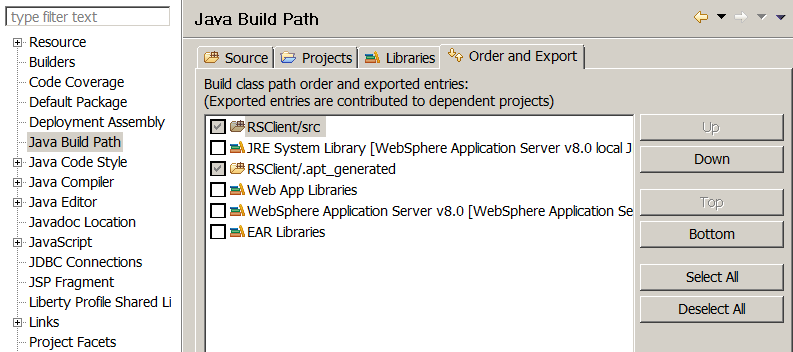
This is because Websphere server runtime API uses a older version of apache libraries.

For compile time change the order within the RAD/eclipse.

For runtime change the settings in WAS.


Note that the settings wouldn't be editable if run/deployed from RAD. Do a manual deployment.

JAX-RS: Basics and Sample App


Create a dynamic web project with JAX-RS support. I used RAD with Websphere implementation of JAX-RS.

Define a resource class

You need to define at least one root resource class.

Root resource classes are POJOs that are either annotated with @Path or have at least one method annotated with @Path or a request method designator, such as @GET, @PUT, @POST, or @DELETE.

Annotations Used:

@Path
The @Path annotation’s value is a relative URI path indicating where the Java class will be hosted: for example, /helloworld. You can also embed variables in the URIs to make a URI path template. For example, you could ask for the name of a user and pass it to the application as a variable in the URI: /helloworld/{username}.

@GET
The @GET annotation is a request method designator and corresponds to the similarly named HTTP method. The Java method annotated with this request method designator will process HTTP GET requests. The behavior of a resource is determined by the HTTP method to which the resource is responding.

@POST
The @POST annotation is a request method designator and corresponds to the similarly named HTTP method. The Java method annotated with this request method designator will process HTTP POST requests. The behavior of a resource is determined by the HTTP method to which the resource is responding.

@PUT
The @PUT annotation is a request method designator and corresponds to the similarly named HTTP method. The Java method annotated with this request method designator will process HTTP PUT requests. The behavior of a resource is determined by the HTTP method to which the resource is responding.

@DELETE
The @DELETE annotation is a request method designator and corresponds to the similarly named HTTP method. The Java method annotated with this request method designator will process HTTP DELETE requests. The behavior of a resource is determined by the HTTP method to which the resource is responding.

@HEAD
The @HEAD annotation is a request method designator and corresponds to the similarly named HTTP method. The Java method annotated with this request method designator will process HTTP HEAD requests. The behavior of a resource is determined by the HTTP method to which the resource is responding.

@PathParam
The @PathParam annotation is a type of parameter that you can extract for use in your resource class. URI path parameters are extracted from the request URI, and the parameter names correspond to the URI path template variable names specified in the @Path class-level annotation.

@QueryParam
The @QueryParam annotation is a type of parameter that you can extract for use in your resource class. Query parameters are extracted from the request URI query parameters.

@Consumes
The @Consumes annotation is used to specify the MIME media types of representations a resource can consume that were sent by the client.

@Produces
The @Produces annotation is used to specify the MIME media types of representations a resource can produce and send back to the client: for example, "text/plain".

@Provider
The @Provider annotation is used for anything that is of interest to the JAX-RS runtime, such as MessageBodyReader and MessageBodyWriter. For HTTP requests, the MessageBodyReader is used to map an HTTP request entity body to method parameters. On the response side, a return value is mapped to an HTTP response entity body by using a MessageBodyWriter. If the application needs to supply additional metadata, such as HTTP headers or a different status code, a method can return a Response that wraps the entity and that can be built using Response.ResponseBuilder.

package com.test;

import javax.ws.rs.GET;
import javax.ws.rs.POST;
import javax.ws.rs.Path;
import javax.ws.rs.Produces;
import javax.ws.rs.core.Response;
// The Java class will be hosted at the URI path /hello
// and based on the methods defined it supports GET 
@Path("/hello")
public class HelloResource {
    @GET
    @Produces("text/plain")
    public String helloGet() {
        return "[GET] Hello from JAX-RS on WebSphere Application server";
    }
}

Now this needs to be deployed as a REST application.
This could be done in 2 ways:

1. Application subclass
Define a class that extends javax.ws.rs.core.Application to define the components of a RESTful Web service application deployment and provide additional metadata.

package com.test;
import javax.ws.rs.ApplicationPath;
import javax.ws.rs.core.Application;
 
@ApplicationPath("/HelloApp")
public class HelloApplication extends Application {
 /*
  * An "empty" (no methods overriden) implementation of javax.ws.rs.core.Application tells the 
  * runtime environment that the service resources are packaged in the web archive (WAR) 
  * and should be scanned for at deployment. 
  *
/// @Override
// public Set<Class<?>> getClasses() {
//  Set<Class<?>> resources = new java.util.HashSet();
//  resources.add(HelloResource.class);
//  return resources;
// }
}

Within the Application subclass, override the getClasses() and getSingletons() methods, as required, to return the list of RESTful Web service resources. A resource is bound to the Application subclass that returns it.
Note that an error is returned if both methods return the same resource.


2. Servlet

Update the web.xml deployment descriptor to configure the servlet and mappings. The method used depends on whether your Web application is using Servlet 3.0 or earlier.
For Servlets 3.0,
If you are using RAD, then you will probably already have this configuration in web.xml.

<servlet>
 <description>JAX-RS Tools Generated - Do not modify</description>
 <servlet-name>JAX-RS Servlet</servlet-name>
 <servlet-class>com.ibm.websphere.jaxrs.server.IBMRestServlet</servlet-class>
 <load-on-startup>1</load-on-startup>
 <enabled>true</enabled>
 <async-supported>false</async-supported>
</servlet>
<servlet-mapping>
 <servlet-name>JAX-RS Servlet</servlet-name>
 <url-pattern>
 /jaxrs/*</url-pattern>
</servlet-mapping>

For pre-Servlets 3.0 look here

Deploy and test

Your rest urls are defined as,
http://[your_hostname]:[your web_container_port=""]/[context_root_of_web_app]/[mapping_pattern]/[resource_uri]

In our case,
http://localhost:9080/RSServer/HelloApp/hello

Test it using a client. The one used here is Advanced-Rest-Client chrome extension.


The information sent to a resource and then passed back to the client is specified as a MIME media type in the headers of an HTTP request or response.
You can specify which MIME media types of representations a resource can respond to or produce by using the following annotations:
@Consumes = javax.ws.rs.Consumes
@Produces = javax.ws.rs.Produces
Though these are optional for most of the cases it's highly recommended.


JAX-RS Client

Since WAS REST implementation is based on Apache Wink you could use Wink API to write your client.

By default, the Apache Wink client uses the java.net.HttpURLConnection class from the Java runtime environment for issuing requests and processing responses. The Apache Wink client can also use Apache HttpClient 4.0 as the underlying client transport.

To implement an Apache Wink REST client, you must first create an org.apache.wink.client.ClientConfig object that is then used to construct an org.apache.wink.client.RestClient. You can change the configuration settings for the ClientConfig object programmatically, or you can use JVM properties to modify the default ClientConfig object values.

ClientConfig object is used to set readTimeout, connectTimeout and to configure Entity providers. ClientConfig object is not mandatory.

You can also use JAX-RS entity providers to help serialize request entities or deserialize response entities.

I created a web application and called the JAX-RS service from one of it's servlets.

String lsUrl = "http://localhost:9080/RSServer/HelloApp/hello";
RestClient client = new RestClient(); //construct a new RestClient using the default client configuration
Resource resource = client.resource(lsUrl);
ClientResponse result = resource.contentType(MediaType.TEXT_PLAIN).get();
System.out.println(result.getEntity(String.class));
//or if the response entity type is known
String result = resource.contentType(MediaType.TEXT_PLAIN).get(String.class);
System.out.println(result);

More info about Wink clients here