blogger templates blogger widgets
Showing posts with label web services. Show all posts
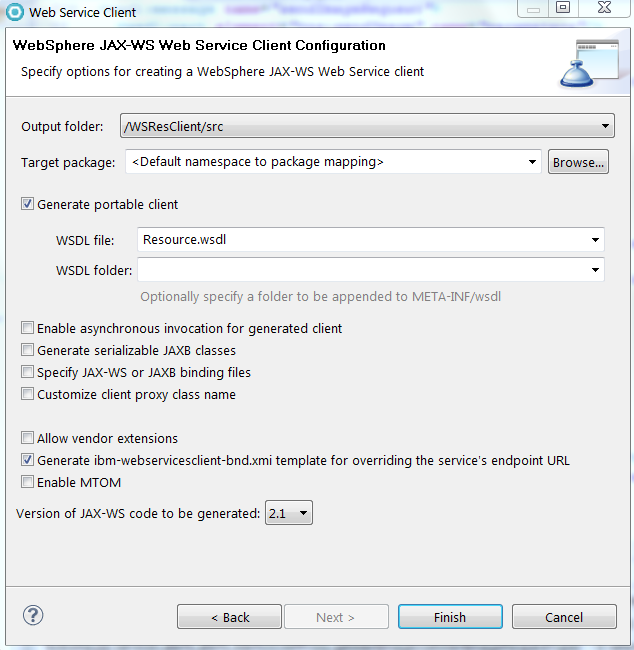
This is part of a list of blog posts.
To browse the contents go to

JAX-RS: Sending/Receiving objects

Note that all primitive datatypes are converted to Wrapper classes. So all we need to discuss is how to send as a response or request to a REST application without doing any custom string/json/xml conversion.

First let's write a service that returns integer as string.
@Path("/hello")
public class HelloResource {
 private static String[] response = { "apple", "banana", "mango" };

 @Path("/fruit")
 @POST
 public String getFruit(String index) {
  System.out.println(index);
  return response[Integer.parseInt(index) % 3];
 }
}

Client code,
String lsUrl = "http://localhost:9080/RSServer/HelloApp/hello/fruit";
RestClient client = new RestClient();
Resource resource = client.resource(lsUrl);
ClientResponse result = resource.contentType(MediaType.TEXT_PLAIN).post("1");
System.out.println(result.getEntity(String.class));

Output:
1
banana


Let's now try to return Integer.

@Path("/hello")
public class HelloResource {
 private static String[] response = { "apple", "banana", "mango" };
 
 @Path("/fruit")
 @POST
 public Integer getFruit(int index) {
  System.out.println(index);
  return response[index % 3];
 }
}

Client code,
String lsUrl = "http://localhost:9080/RSServer/HelloApp/hello/fruit";
RestClient client = new RestClient();
Resource resource = client.resource(lsUrl);
//ClientResponse result = resource.contentType(MediaType.TEXT_PLAIN).post(1);
// cannot do like this
//java.lang.RuntimeException: A javax.ws.rs.ext.MessageBodyWriter implementation was not found for the class java.lang.Integer type and text/plain media type.

Couldn't find a workaround for this using Wink/IBM implementation but there seems to be a way to do it using jersy as explained here

Another approach is to represent a mime type corresponding to your data and create custom entity providers.
By adding a custom entity provider, you can de-serialize custom Java types from message bodies and serialize any media type as message bodies.

Let's say you have object of class MyObject.

import java.io.Serializable;

public class MyObject implements Serializable {
 public static final String MIME_TYPE = "application/myType";

 private int index;

 public MyObject() {
 }

 public MyObject(int index) {
  this.index = index;
 }

 public int getIndex() {
  return index;
 }

 public void setIndex(int index) {
  this.index = index;
 }
}

import java.io.IOException;
import java.io.InputStream;
import java.io.ObjectInputStream;
import java.lang.annotation.Annotation;
import java.lang.reflect.Type;

import javax.ws.rs.Consumes;
import javax.ws.rs.WebApplicationException;
import javax.ws.rs.core.MediaType;
import javax.ws.rs.core.MultivaluedMap;
import javax.ws.rs.ext.MessageBodyReader;
import javax.ws.rs.ext.Provider;

@Provider
@Consumes(MyObject.MIME_TYPE)
public class MyReader implements MessageBodyReader<myobject> {

 @Override
 public boolean isReadable(Class<?> type, Type type1, Annotation[] antns,
   MediaType mt) {
  return MyObject.class.isAssignableFrom(type);
 }

 @Override
 public MyObject readFrom(Class<myobject> type, Type type1,
   Annotation[] antns, MediaType mt,
   MultivaluedMap<String, String> mm, InputStream in)
   throws IOException, WebApplicationException {
  try {
   ObjectInputStream ois = new ObjectInputStream(in);
   return (MyObject) ois.readObject();
  } catch (ClassNotFoundException ex) {
   ex.printStackTrace();
  }
  return null;
 }
}

import java.io.IOException;
import java.io.ObjectOutputStream;
import java.io.OutputStream;
import java.lang.annotation.Annotation;
import java.lang.reflect.Type;

import javax.ws.rs.Produces;
import javax.ws.rs.WebApplicationException;
import javax.ws.rs.core.MediaType;
import javax.ws.rs.core.MultivaluedMap;
import javax.ws.rs.ext.MessageBodyWriter;
import javax.ws.rs.ext.Provider;

@Provider
@Produces(MyObject.MIME_TYPE)
public class MyWriter implements MessageBodyWriter<myobject> {

 @Override
 public boolean isWriteable(Class<?> type, Type type1, Annotation[] antns,
   MediaType mt) {
  return MyObject.class.isAssignableFrom(type);
 }

 @Override
 public long getSize(MyObject t, Class<?> type, Type type1,
   Annotation[] antns, MediaType mt) {
  // As of JAX-RS 2.0, the method has been deprecated and the
  // value returned by the method is ignored by a JAX-RS runtime.
  // All MessageBodyWriter implementations are advised to return -1 from
  // the method.

  return -1;
 }

 @Override
 public void writeTo(MyObject t, Class<?> type, Type type1,
   Annotation[] antns, MediaType mt,
   MultivaluedMap<String, Object> mm, OutputStream out)
   throws IOException, WebApplicationException {
  ObjectOutputStream oos = new ObjectOutputStream(out);
  oos.writeObject(t);
 }
}


Client code,
//note that client needs access to Writer and Reader classes.
ClientConfig clientConfig = new ClientConfig();
Application app = new javax.ws.rs.core.Application() {
 public Set<Class<?>> getClasses() {
  Set<Class<?>> classes = new HashSet<Class<?>>();
  classes.add(MyReader.class);
  classes.add(MyWriter.class);
  return classes;
 }
};
clientConfig.applications(app);

String lsUrl = "http://localhost:9080/RSServer/HelloApp/hello/fruit";
RestClient client = new RestClient(clientConfig);
Resource resource = client.resource(lsUrl);
String result = resource.contentType(MyObject.MIME_TYPE).post(
  String.class, new MyObject(1));
System.out.println(result);

JAX-RS: Sending XML data


Instead of transforming XML to and from native Java types in a tedious manner, you can leverage the advantages of using JAXB objects. Even though you can use the javax.xml.transform.Source, java.io.InputStream, or java.lang.String interfaces or even a simple byte array to store the XML either as a request or response entity, JAXB enables easier data binding

import javax.xml.bind.annotation.XmlRootElement;
import javax.xml.bind.annotation.XmlType;

@XmlRootElement(name="note")
@XmlType
public class Note {

    private Long id;
    private String text;

    public Note() {
    }

    public Note(Long id, String text) {
        this.id = id;
        this.text = text;
    }

    public Long getId() {
        return id;
    }

    public void setId(Long id) {
        this.id = id;
    }

    public String getText() {
        return text;
    }

    public void setText(String text) {
        this.text = text;
    }

}

import javax.xml.bind.annotation.XmlElement;
import javax.xml.bind.annotation.XmlRootElement;
import javax.xml.bind.annotation.XmlTransient;

@XmlRootElement(name="notes")
public class NotesList {

    @XmlElement(name="note")
    private List<note> notes = new ArrayList<note>();

    public NotesList() {
    }

    @XmlTransient
    public List getNotes() {
        return notes;
    }

    public void setNotes(List notes) {
        this.notes = notes;
    }
}


@Path("/hello")
public class HelloResource {

    @Path("/notes")
    @GET
    public NotesList list() {
        List listOfNotes = new ArrayList();
        listOfNotes.add(new Note(1L,"one"));
        listOfNotes.add(new Note(2L,"two"));
        NotesList response = new NotesList();
        response.getNotes().addAll(listOfNotes);
        return response;
    }
}

You could write a client or test it using a tool like Advanced Rest client chrome extension.


By default, the JAX-RS runtime environment attempts to create and use a default JAXBContext class for JAXB classes. However, if the default JAXBContext class is not suitable, then you can supply a JAXBContext class for the application using a JAX-RS ContextResolver provider interface.

This scenario might occur because of complexities of the JAXB classes for the application. You must add the @Provider annotation to the class; for example:

//below example from IBM knowledge center
@Provider
public class MyContextResolver implements ContextResolver<jaxbcontext> {
     public JAXBContext getContext(Class<?> aType) {
         if(aType == Book.class) {
             JAXBContext myContext = /* This statement creates create a JAXB Context. */ 
             return myContext;
         }
         /* This method returns null for any types not understood.
            If null is returned, other application supplied ContextResolver<jaxbcontext>
            will be used if available */
         return null;
     }
 }
Add this class to the set of classes to return in your application sub-class, just as you did with your resource classes.

JAX-RS: Sending multipart form data


You need to send or received data as "multipart/form-data" if it involves data like files.

@Path("/hello")
public class HelloResource {
@Path("fileupload")
 @POST
 @Consumes("multipart/form-data")
 @Produces("multipart/form-data")
 public Response postFormData(@FormParam("fileid") int theFileid,
                              @FormParam("description") String theDescription,
                              @FormParam("thefile") File theFile) {
  // echo what we got in the form
     BufferedOutMultiPart bomp = new BufferedOutMultiPart();
     OutPart op = new OutPart();
     op.setLocationHeader("thefile");
     op.setBody(theFile);
     op.setContentType(MediaType.TEXT_PLAIN);  //or other appropriate type
     bomp.addPart(op);
     
     op = new OutPart();
     op.setLocationHeader("description");
     op.setBody(theDescription);
     op.setContentType(MediaType.TEXT_PLAIN);
     bomp.addPart(op);

     op = new OutPart();
     op.setLocationHeader("fileid");
     op.setBody(theFileid + "");  //just in case theFileid is uninitialized
     op.setContentType(MediaType.TEXT_PLAIN);
     bomp.addPart(op);

     return Response.ok(bomp, "multipart/form-data").build();
 }
}

<form action="/RSServer/HelloApp/hello/fileupload" method="post"
 enctype="multipart/form-data">
 FileId: <input type="text" name="fileid" /> 
FileDesc: <input type="text" name="description" /> 
<input type="file" name="thefile" /> 
<input type="submit" name="submit" value="submit" />
</form>

The originator of the form POST submission can generate a Content-Transfer-Encoding header for one or more parts of the multipart message. The IBM JAX-RS implementation attempts to auto-decode the payload of the part according to this header when the header is of base64 or quoted-printable encoding type.
(optional) If you do not want the IBM JAX-RS implementation to auto-decode the part payload, put the @Encoded annotation on the method parameter. The following example illustrates the use of the @Encoded annotation on the method parameter:
@POST
@Consumes("multipart/form-data")
@Produces("multipart/form-data")
public Response postFormData(@FormParam("fileid") int theFileid,
                             @FormParam("description") String theDescription,
                             @Encoded @FormParam("thefile") File theFile) {
    // don't auto-decode the file part payload
    ...
}

If you want to have complete control of the retrieval and decoding of all parts in a multipart/form-data message, you can receive the BufferedInMultiPart object itself:
import org.apache.wink.common.model.multipart.BufferedInMultiPart;
import org.apache.wink.common.model.multipart.InPart;
@POST
@Consumes("multipart/form-data")
@Produces("multipart/form-data")
public Response postFormData(BufferedInMultiPart bimp) {
    List parts = bimp.getParts();
    // iterate over the "parts" and process them however you like
}

JAX-RS: Sending form data


Form data could be easily consumed using @FormParam annotations.

Server code,
@Path("/hello")
public class HelloResource {
    @POST
    @Produces("text/plain")
    @Consumes("application/x-www-form-urlencoded") 
    public Response helloPost(@FormParam("username") String username ) {
        return Response.status(200).entity("[POST] Hello "+username+" from JAX-RS on WebSphere Application server").build();
    }
}

Client code,
//did not work, got runtime exception: java.lang.NoClassDefFoundError:org.apache.wink.common.internal.MultivaluedMapImpl
//neither was the class, javax.ws.rs.core.MultivaluedMapImpl available even at compile time.
String lsUrl = "http://localhost:9080/RSServer/HelloApp/hello";
RestClient client = new RestClient();
Resource resource = client.resource(lsUrl);
MultivaluedMap<String, String> queryParams = new MultivaluedMapImpl<String, String>();
queryParams.add("username", "John");
ClientResponse result = resource.contentType(MediaType.TEXT_PLAIN).queryParams(queryParams).post(new String("John"));
System.out.println(result.getEntity(String.class));

But invoking it using a form worked,
<!DOCTYPE HTML>
<%@page language="java" contentType="text/html; charset=ISO-8859-1" pageEncoding="ISO-8859-1"%>
<html>
<head>
<meta http-equiv="Content-Type" content="text/html; charset=ISO-8859-1">
<title>Form Page</title>
</head>
<body>
 <h1>
Submit the following form</h1>
<form action="/RSServer/HelloApp/hello" method="post">
User Name: <input type="text" name="username" /> 
  <input type="submit" value="Submit" />
 </form>
</body>
</html>


JAX-RS: Sending/Receiving cookies

Server code,
@Path("/hello")
public class HelloResource {
    @GET
    public Response helloGet(@javax.ws.rs.CookieParam("username") String username) {
      return Response.ok("[GET] Hello "+username+" from JAX-RS on WebSphere Application server")
                 .cookie(new NewCookie("key","value"))
                 .build();
    }
}

Client code,
String lsUrl = "http://localhost:9080/RSServer/HelloApp/hello";
RestClient client = new RestClient();
Resource resource = client.resource(lsUrl);
ClientResponse result = resource.contentType(MediaType.TEXT_PLAIN).cookie(new Cookie("username", "John")).get();
System.out.println(result.getEntity(String.class));

To obtain a general map of parameter names and values for query and path parameters, use the following code:
@GET
public String get(@Context UriInfo ui) {
    MultivaluedMap<String, String> queryParams = ui.getQueryParameters();
    MultivaluedMap<String, String> pathParams = ui.getPathParameters();
}

JAX-RS: Changing Request headers


Adding HTTP headers on server

Server code,
@Path("/hello")
public class HelloResource {
    @POST
    @Produces("text/plain")
    @Consumes("text/plain")
    public Response helloPost(String username) {
        return Response.ok("[POST] Hello "+username+" from JAX-RS on WebSphere Application server")
                       .header("myHeaderKey", "myHeaderValue")
                       .build();
    }
}

Client code,
String lsUrl = "http://localhost:9080/RSServer/HelloApp/hello";
RestClient client = new RestClient();
Resource resource = client.resource(lsUrl);
ClientResponse result = resource.contentType(MediaType.TEXT_PLAIN).post(new String("John")); 
System.out.println(result.getEntity(String.class));
System.out.println(result.getHeaders().get("myHeaderKey"));

Output:
[POST] Hello John from JAX-RS on WebSphere Application server
[myHeaderValue]


Adding HTTP headers on client

Server code,
@Path("/hello")
public class HelloResource {
    @POST
    @Produces("text/plain")
    @Consumes("text/plain")
    public String helloPost(String username,  @Context HttpHeaders headers) {
     System.out.println(headers.getRequestHeader("myHeaderKey"));
  //use this to get both headers and cookies
  //MultivaluedMap headerParams = hh.getRequestHeaders();
        //Map pathParams = hh.getCookies();
        return "[POST] Hello "+username+" from JAX-RS on WebSphere Application server";
    }
}

Client code,
String lsUrl = "http://localhost:9080/RSServer/HelloApp/hello";
RestClient client = new RestClient();
Resource resource = client.resource(lsUrl);
ClientResponse result = resource.contentType(MediaType.TEXT_PLAIN).header("myHeaderKey", "myHeaderValue").post(new String("John")); 
System.out.println(result.getEntity(String.class));

Output:
[myHeaderValue]
[POST] Hello John from JAX-RS on WebSphere Application server

JAX-RS: Request Method Designator Annotations

Request method designator annotations are runtime annotations, defined by JAX-RS, that correspond to the similarly named HTTP methods.
By default, the JAX-RS runtime will automatically support the methods HEAD and OPTIONS if not explicitly implemented. For HEAD, the runtime will invoke the implemented GET method, if present, and ignore the response entity, if set. For OPTIONS, the Allow response header will be set to the set of HTTP methods supported by the resource.

Sample using POST request method,
@Path("/hello")
public class HelloResource {
    @POST
    @Produces("text/plain")
    @Consumes("text/plain")
    public String helloPost(String username) {
        return "[POST] Hello "+username+" from JAX-RS on WebSphere Application server";
    }
}

Client code,
String lsUrl = "http://localhost:9080/RSServer/HelloApp/hello";
RestClient client = new RestClient();
Resource resource = client.resource(lsUrl);
String result = resource.contentType(MediaType.TEXT_PLAIN).post(String.class, new String("John"));
System.out.println(result);

JAX-RS: URIs and the Path annotations


The @Path annotation identifies the URI path template to which the resource responds and is specified at the class or method level of a resource.

URI path templates are URIs with variables embedded within the URI syntax. These variables are substituted at runtime in order for a resource to respond to a request based on the substituted URI. Variables are denoted by braces ({ and }).
eg:
@Path("/users/{username}")

A @Path value isn’t required to have leading or trailing slashes (/). The JAX-RS runtime parses URI path templates the same whether or not they have leading or trailing spaces.

By default, the URI variable must match the regular expression "[^/]+?"
This variable may be customized by specifying a different regular expression after the variable name.
eg:
 @Path("users/{username: [a-zA-Z][a-zA-Z_0-9]*}")

A URI path template has one or more variables, with each variable name surrounded by braces: { to begin the variable name and } to end it.
eg:
@Path("/{name1}/{name2}/")

You consume and use these parameters, add a @javax.ws.rs.PathParam annotation in either the resource constructor or the resource method.

Sample using @PathParam,
@Path("/hello/{username}")
public class HelloResource {
 @GET
 public String helloGet(@javax.ws.rs.PathParam("username") String username) {
  return "[GET] Hello "+username+" from JAX-RS on WebSphere Application server";
 }
}

Client code,
String lsUrl = "http://localhost:9080/RSServer/HelloApp/hello/John";
RestClient client = new RestClient();
Resource resource = client.resource(lsUrl);
ClientResponse result = resource.contentType(MediaType.TEXT_PLAIN).get();
System.out.println(result.getEntity(String.class));

Sample using @MatrixParam,
@Path("/hello")
public class HelloResource {
@GET
public String helloGet(@javax.ws.rs.MatrixParam("username") String username) {
return "[GET] Hello "+username+" from JAX-RS on WebSphere Application server";
}
}

Client code,
String lsUrl = "http://localhost:9080/RSServer/HelloApp/hello;username=John";
RestClient client = new RestClient();
Resource resource = client.resource(lsUrl);
ClientResponse result = resource.contentType(MediaType.TEXT_PLAIN).get();
System.out.println(result.getEntity(String.class));

Sample using @QueryParam,
@Path("/hello")
public class HelloResource {
@GET
public String helloGet(@javax.ws.rs.QueryParam("username") String username) {
return "[GET] Hello "+username+" from JAX-RS on WebSphere Application server";
}
}

Client code,
String lsUrl = "http://localhost:9080/RSServer/HelloApp/hello?username=John";
RestClient client = new RestClient();
Resource resource = client.resource(lsUrl);
ClientResponse result = resource.contentType(MediaType.TEXT_PLAIN).get();
System.out.println(result.getEntity(String.class));
(or)
String lsUrl = "http://localhost:9080/RSServer/HelloApp/hello";
RestClient client = new RestClient();
Resource resource = client.resource(lsUrl);
ClientResponse result = resource.contentType(MediaType.TEXT_PLAIN).queryParam("username", "John").get();
System.out.println(result.getEntity(String.class));

@DefaultValue annotation is used to specify a default value.
eg:
@DefaultValue("unknown") @javax.ws.rs.QueryParam("username") 

Both @QueryParam and @PathParam can be used only on the following Java types:


  • All primitive types except char
  • All wrapper classes of primitive types except Character
  • Any class with a constructor that accepts a single String argument
  • Any class with the static method named valueOf(String) that accepts a single String argument
  • List, Set, or SortedSet, where T matches the already listed criteria. Sometimes, parameters may contain more than one value for the same name. If this is the case, these types may be used to obtain all values

Axis 2 webservice notes

Eclipse's Web Tools Platform supports Axis 2.x

1. Download the latest Axis2 runtime from here(http://ws.apache.org/axis2/download.cgi) and extract it.
2. Now we point Eclipse WTP to downloaded Axis2 Runtime. Open Window -> Preferences -> Web Services -> Axis2 Preferences
Select the Axis2 Runtime tab and point to the correct Axis2 runtime location.


3. Creating webservice

a) Create a dynamic web project. (Axis2Server)
b) In project facets,
Set Dynamic Web Module facet to 2.2, 2.3, 2.4 or 2.5.
If unable to change it edit .settings/org.eclipse.wst.common.project.facet.core.xml file
(this file is displayed in Navigator view)

Set Axis2 Web Services facet.


c) Create service resource


package com.ws.hello;

import com.ws.bean.InnerBean;
import com.ws.bean.MyBean;

public class HelloOperation {
 public String sayHello(String name){
  return "Hello "+name;
 }
 public MyBean sayBean(){
  MyBean bean = new MyBean();
  InnerBean ibean = new InnerBean();
  ibean.setBeanVal("this is bean value");
  bean.setIb(ibean);
  return bean;
 }
}


package com.ws.bean;

public class InnerBean {
 private String beanVal;

 public String getBeanVal() {
  return beanVal;
 }

 public void setBeanVal(String beanVal) {
  this.beanVal = beanVal;
 }
}
package com.ws.bean;

public class MyBean {
 private InnerBean ib;

 public InnerBean getIb() {
  return ib;
 }

 public void setIb(InnerBean ib) {
  this.ib = ib;
 }
}

d) Select HelloOperation.java, open File -> New -> Other... -> Web Services -> Web Service
Check server, webservice runtime and service project.

click next.
This page is the service.xml selection page. if you have a custom services.xml, you can include that by clicking the Browse button.
For the moment, just leave it at the default.

Test the deployed webservice endpoint.
http://localhost:8085/Axis2Server/axis2-web/index.jsp

http://localhost:8085/Axis2Server/services/HelloOperation?wsdl


4. Creating client

Create a dynamic web project and enable axis2 project facet.
Now we'll generate the client for the newly created service by referring the wsdl generated by the Axis2 Server.
Open File -> New -> Other... -> Web Services -> Web ServiceClient.


Check server/webservice runtime and project selected. All the rest i kept default.

Note that after successful client code generation. You will find a stub and callback handler class in client project.
Try the below code in a main function or servlet method.
HelloOperationStub stub = new HelloOperationStub();
SayHello sayHello = new SayHello();
sayHello.setName("john");
SayHelloResponse response = stub.sayHello(sayHello);
System.out.println(response.get_return());

SayBean temp = new SayBean();

SayBeanResponse response1 = stub.sayBean(temp);
System.out.println(response1.get_return().getIb().getBeanVal());   

JAX-WS

The same steps follow as in JAX-RS. The major difference in when you generate the client and server code.
The web service runtime selected will be IBM Websphere JAX-WS.

WS server implementation:

@javax.jws.WebService (endpointInterface="com.server.Calculator", targetNamespace="http://server.com/Calculator/", serviceName="Calculator", portName="CalculatorSOAP")
public class CalculatorSOAPImpl{

    public String calculate(CalcRequestType in) {
     //do business operation here or delegate it to a business component
     System.out.println(in.getOperand1());
     System.out.println(in.getOperand2());
     System.out.println(in.getOperation().toString());
     try {
   Thread.sleep(8000);
  } catch (InterruptedException e) {
   e.printStackTrace();
  }
     if(in.getOperation().equals(OperationType.ADD)){
      return Integer.toString(in.getOperand1()+in.getOperand2());
     }else {
      return Integer.toString(in.getOperand1()-in.getOperand2());
     }
    }

}

The steps for client also is mostly the same except that the runtime selected will be JAX-WS.

WS client call using servlet,


public class TestServlet extends HttpServlet {
 private static final long serialVersionUID = 1L;
       
    public TestServlet() {
        super();
        // TODO Auto-generated constructor stub
    }


 protected void doGet(HttpServletRequest request, HttpServletResponse response) throws ServletException, IOException {
  System.out.println("Called WS");
  CalculatorSOAPProxy proxy = new CalculatorSOAPProxy();
  proxy._getDescriptor().setEndpoint("http://localhost:9089/WS2Server/Calculator");
  CalcRequestType in = new CalcRequestType();
  in.setOperand1(5);
  in.setOperand2(10);
  in.setOperation(OperationType.ADD);
  String result = proxy.calculate(in);
  System.out.println(result);
 }

}

Here is a useful diagram for JAXWS Client API.


After deploying it on the server, we hit http://localhost:9089/WS2Server/Calculator

And the page displays,

{http://server.com/Calculator/}Calculator

Hello! This is an Axis2 Web Service!

Notice that JAX-WS still uses JDNI runtime.

InitialContext ctx = new InitialContext();
_service = (com.server.calculator.Calculator_Service)ctx.lookup("java:comp/env/service/Calculator");

But you wouldn't find anything defined in web.xml. It's because everything is done through annotations.

@WebServiceClient(name = "Calculator", targetNamespace = "http://server.com/Calculator/", wsdlLocation = "WEB-INF/wsdl/Calculator.wsdl")
public class Calculator_Service extends Service
{
  ....
}

Metro web service notes

Java 7 contains a JAX-WS (RI) implementation. But it's functionality is limited.

Metro is a high-performance, extensible, easy-to-use web service stack that is build on top of RI: https://jax-ws.java.net/.


1. Download the latest Metro runtime from here(https://metro.java.net/2.3/) and extract it.

2. Copy the jars available from the download into the tomcat/lib.

3. Creating webservice

a) Create a dynamic web project. (WSServer)

You write your interface and implementation class.
package com.ws.inf;

import javax.jws.WebMethod;
import javax.jws.WebService;
import javax.jws.soap.SOAPBinding;
import javax.jws.soap.SOAPBinding.Style;
import com.ws.bean.MyBean;
@WebService
@SOAPBinding(style = Style.RPC)
public interface HelloWorld{
 
 @WebMethod MyBean getHelloWorldAsString();
}

package com.ws.imp;

import javax.jws.WebService;
import com.ws.bean.InnerBean;
import com.ws.bean.MyBean;
import com.ws.inf.HelloWorld;

@WebService(endpointInterface = "com.ws.inf.HelloWorld")
public class HelloWorldImpl implements HelloWorld{

 @Override
 public MyBean getHelloWorldAsString() {
  MyBean b = new MyBean(2);
  InnerBean ib = new InnerBean();
  ib.setValue("hello");
  b.setIb(ib);
  return b;
 }
}

Bean classes,
package com.ws.bean;

public class InnerBean {
 private String beanVal;

 public String getBeanVal() {
  return beanVal;
 }

 public void setBeanVal(String beanVal) {
  this.beanVal = beanVal;
 }
}
package com.ws.bean;

public class MyBean {
 private InnerBean ib;
 private int value;
 public MyBean() {

 }

 public MyBean(int v) {
 value = v;
 }

 public void setValue(int value) {
 this.value = value;
 }

 public int getValue() {
 return value;
 }
 public InnerBean getIb() {
  return ib;
 }

 public void setIb(InnerBean ib) {
  this.ib = ib;
 }
}


b) Create WEB-INF/sun-jaxws.xml


<?xml version="1.0" encoding="UTF-8"?>
<endpoints
  xmlns="http://java.sun.com/xml/ns/jax-ws/ri/runtime"
  version="2.0">
  <endpoint
      name="HelloWorld"
      implementation="com.ws.imp.HelloWorldImpl"
      url-pattern="/hello"/>
</endpoints>


c) Entries in web.xml


<listener>
 <listener-class>
   com.sun.xml.ws.transport.http.servlet.WSServletContextListener
 </listener-class>
</listener>
<servlet>
 <servlet-name>hello</servlet-name>
 <servlet-class>
  com.sun.xml.ws.transport.http.servlet.WSServlet
 </servlet-class>
 <load-on-startup>1</load-on-startup>
</servlet>
<servlet-mapping>
 <servlet-name>hello</servlet-name>
 <url-pattern>/hello</url-pattern>
</servlet-mapping>
<session-config>
 <session-timeout>120</session-timeout>
</session-config>

Note that if you are planning to test the webservice on a main method instead of a container then all you need to do is,

Endpoint.publish("http://localhost:8085/WSServer/hello", new HelloWorldImpl());

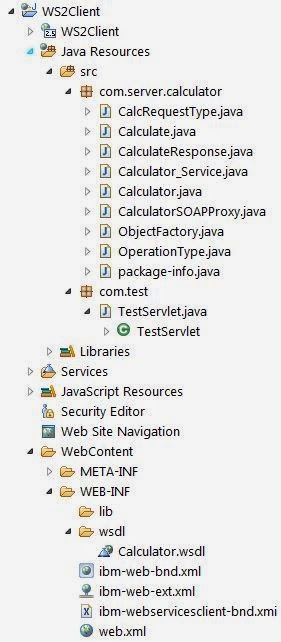
Here is a snapshot of project hierarchy.


d) Deploy on tomcat.

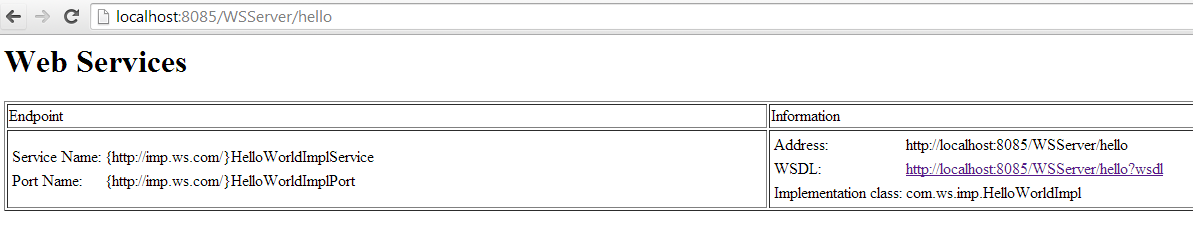
Check
http://localhost:8085/WSServer/hello


WSDL definition,
http://localhost:8085/WSServer/hello?wsdl
Namespace definition,
http://localhost:8085/WSServer/hello?wsdl=1
XSD definition,
http://localhost:8085/WSServer/hello?xsd=1


4. Writing client.

URL wsdlUrl = new URL("http://localhost:8085/WSServer/hello?wsdl");

// qualifier name ...
QName serviceName = new QName("http://imp.ws.com/",
  "HelloWorldImplService");

QName portName = new QName("http://imp.ws.com/",
  "HelloWorldImplPort");

Service service = Service.create(wsdlUrl, serviceName);

HelloWorld helloWorldInterface = service.getPort(portName, HelloWorld.class);

System.out.println(helloWorldInterface.getHelloWorldAsString().getValue());
System.out.println(helloWorldInterface.getHelloWorldAsString().getInbean().getValue());

For Document style you just specify the annotations,
@SOAPBinding(style = Style.DOCUMENT, use=Use.ENCODED)
It's optional to use JAXB annotations and I guess that makes
metro really easy to work with.


JAX-WS Tutorial

Standalone WS client

WS clients that do not run in any J2EE container are known as unmanaged clients. So a standalone WS client is an example of unmanaged client where as those running on a server are called as managed clients.


System.out.println("Client calling JAX-WS");
CalculatorSOAPProxy proxy = new CalculatorSOAPProxy();
proxy._getDescriptor().setEndpoint(
    "http://localhost:9089/WS2Server/Calculator");
CalcRequestType in = new CalcRequestType();
in.setOperand1(5);
in.setOperand2(10);
in.setOperation(OperationType.ADD);
String result = proxy.calculate(in);
System.out.println(result);
JAX-WS Asynchronous

No changes to be made to server code. It is the client that acts asynchronous.

I used a standalone WS client to test it.

System.out.println("Client calling WS");
CalculatorSOAPProxy proxy = new CalculatorSOAPProxy();
proxy._getDescriptor().setEndpoint(
        "http://localhost:9089/WS2Server/Calculator");
CalcRequestType in = new CalcRequestType();
in.setOperand1(5);
in.setOperand2(10);
in.setOperation(OperationType.ADD);
/**
 * Using a polling model
 */

Response response = proxy.calculateAsync(in);
System.out.println("Checking result");

while (!response.isDone()) {
    // You can do some work that does not depend on the webservice
    System.out.println("isDone? " + response.isDone());
    Thread.sleep(1000);
    
}
CalculateResponse result = response.get();
System.out.println(result.getOut());

Client calling WS
Checking result
isDone? false
isDone? false
isDone? false
isDone? false
isDone? false
isDone? false
isDone? false
isDone? false
isDone? false
15

System.out.println("Client calling WS");
CalculatorSOAPProxy proxy = new CalculatorSOAPProxy();
proxy._getDescriptor().setEndpoint(
        "http://localhost:9089/WS2Server/Calculator");
CalcRequestType in = new CalcRequestType();
in.setOperand1(5);
in.setOperand2(10);
in.setOperation(OperationType.ADD);
/**
 * Using the callback model
 */

ResponseCallBackHandler handler = new ResponseCallBackHandler();
Future response = proxy.calculateAsync(in, handler);
while(!response.isDone()){
    System.out.println("isDone? "+response.isDone());
    Thread.sleep(1000);
}
System.out.println(handler.getCalResult());

import java.util.concurrent.ExecutionException;
import javax.xml.ws.AsyncHandler;
import javax.xml.ws.Response;
import com.server.calculator.CalculateResponse;

public class ResponseCallBackHandler implements
AsyncHandler {
 
 private String calResult;
 
 @Override
 public void handleResponse(Response res) {
  System.out.println("Handler invoked");
  try {
   CalculateResponse response = res.get();
   calResult = response.getOut();
   
  } catch (InterruptedException e) {
   e.printStackTrace();
  } catch (ExecutionException e) {
   e.printStackTrace();
  }
  
  
 }

 public void setCalResult(String calResult) {
  this.calResult = calResult;
 }

 public String getCalResult() {
  return calResult;
 }
}

Output logs:

Client calling WS
isDone? false
isDone? false
isDone? false
isDone? false
isDone? false
isDone? false
isDone? false
isDone? false
isDone? false
Handler invoked
15


public class TestServlet extends HttpServlet {
 private static final long serialVersionUID = 1L;

 public TestServlet() {
  super();
 }

 protected void doGet(HttpServletRequest request,
   HttpServletResponse response) throws ServletException, IOException {
  System.out.println("Client calling WS");

  CalculatorSOAPProxy proxy = new CalculatorSOAPProxy();
  proxy._getDescriptor().setEndpoint(
    "http://localhost:9089/WS2Server/Calculator");
  BindingProvider bp = (BindingProvider) proxy._getDescriptor()
    .getProxy();
  bp.getResponseContext().put(
    "com.ibm.websphere.webservices.use.async.mep", Boolean.TRUE);

  CalcRequestType in = new CalcRequestType();
  in.setOperand1(5);
  in.setOperand2(10);
  in.setOperation(OperationType.ADD);
  ResponseCallBackHandler handler = new ResponseCallBackHandler();
  Future wsResponse = proxy.calculateAsync(in, handler);

  while (!wsResponse.isDone()) {
   System.out.println("isDone? " + wsResponse.isDone());
   try {
    Thread.sleep(1000);
   } catch (InterruptedException e) {
    e.printStackTrace();
   }
  }
  System.out.println(handler.getCalResult());
 }
}

[6/1/14 18:37:20:082 IST] 00000025 SystemOut O Client calling WS
[6/1/14 18:37:20:605 IST] 00000025 SystemOut O isDone? false
[6/1/14 18:37:20:644 IST] 00000070 WSChannelFram A CHFW0019I: The Transport Channel Service has started chain HttpOutboundChain:localhost:9089.
[6/1/14 18:37:20:729 IST] 00000024 SystemOut O 5
[6/1/14 18:37:20:730 IST] 00000024 SystemOut O 10
[6/1/14 18:37:20:730 IST] 00000024 SystemOut O ADD
[6/1/14 18:37:21:605 IST] 00000025 SystemOut O isDone? false
[6/1/14 18:37:22:605 IST] 00000025 SystemOut O isDone? false
[6/1/14 18:37:23:605 IST] 00000025 SystemOut O isDone? false
[6/1/14 18:37:24:605 IST] 00000025 SystemOut O isDone? false
[6/1/14 18:37:25:605 IST] 00000025 SystemOut O isDone? false
[6/1/14 18:37:26:605 IST] 00000025 SystemOut O isDone? false
[6/1/14 18:37:27:605 IST] 00000025 SystemOut O isDone? false
[6/1/14 18:37:28:605 IST] 00000025 SystemOut O isDone? false
[6/1/14 18:37:28:762 IST] 00000071 SystemOut O Handler invoked
[6/1/14 18:37:29:605 IST] 00000025 SystemOut O 15

JAX-WS: MTOM

Let's try sending binary attachments without using MTOM.


<!--?xml version="1.0" encoding="UTF-8"?--><wsdl:definitions name="Resource" targetNamespace="http://server.com/Resource/" xmlns:soap="http://schemas.xmlsoap.org/wsdl/soap/" xmlns:tns="http://server.com/Resource/" xmlns:wsdl="http://schemas.xmlsoap.org/wsdl/" xmlns:xsd="http://www.w3.org/2001/XMLSchema">
  <wsdl:types>
    <xsd:schema targetNamespace="http://server.com/Resource/">
      <xsd:element name="sendImage">
        <xsd:complexType>
          <xsd:sequence>

           <xsd:element maxOccurs="1" minOccurs="0" name="in" type="xsd:base64Binary"/>
          </xsd:sequence>
        </xsd:complexType>
      </xsd:element>
      <xsd:element name="sendImageResponse">
        <xsd:complexType>
          <xsd:sequence>
            <xsd:element maxOccurs="1" minOccurs="0" name="out" type="xsd:base64Binary"/>
          </xsd:sequence>
        </xsd:complexType>
      </xsd:element>
    </xsd:schema>
  </wsdl:types>
  <wsdl:message name="sendImageRequest">
    <wsdl:part element="tns:sendImage" name="parameters"/>
  </wsdl:message>
  <wsdl:message name="sendImageResponse">
    <wsdl:part element="tns:sendImageResponse" name="parameters"/>
  </wsdl:message>
  <wsdl:portType name="Resource">
    <wsdl:operation name="sendImage">
      <wsdl:input message="tns:sendImageRequest"/>
      <wsdl:output message="tns:sendImageResponse"/>
    </wsdl:operation>
  </wsdl:portType>
  <wsdl:binding name="ResourceSOAP" type="tns:Resource">
    <soap:binding style="document" transport="http://schemas.xmlsoap.org/soap/http"/>
    <wsdl:operation name="sendImage">
      <soap:operation soapAction="http://server.com/Resource/sendImage"/>
      <wsdl:input>
        <soap:body use="literal"/>
      </wsdl:input>
      <wsdl:output>
        <soap:body use="literal"/>
      </wsdl:output>
    </wsdl:operation>
  </wsdl:binding>
  <wsdl:service name="Resource">
    <wsdl:port binding="tns:ResourceSOAP" name="ResourceSOAP">
      <soap:address location="http://localhost:9089/WSResServer/Resource"/>
    </wsdl:port>
  </wsdl:service>
</wsdl:definitions>

@javax.jws.WebService (endpointInterface="com.server.Resource", targetNamespace="http://server.com/Resource/", serviceName="Resource", portName="ResourceSOAP", wsdlLocation="WEB-INF/wsdl/Resource.wsdl")
public class ResourceSOAPImpl{

    public byte[] sendImage(byte[] in) {
     byte[] fileData = null;
     System.out.println("WS Server");
     System.out.println(new String(in));
     try {
      File file = new File("");
   FileInputStream fileIn = new FileInputStream(file);
   fileData = new byte[(int) file.length()];
   System.out.println(file.length());
   fileIn.read(fileData);
  } catch (FileNotFoundException e) {
   // TODO Auto-generated catch block
   e.printStackTrace();
  } catch (IOException e) {
   // TODO Auto-generated catch block
   e.printStackTrace();
  }
        return fileData;
    }
}

Client code,

System.out.println("Client calling WS");
ResourceSOAPProxy proxy = new ResourceSOAPProxy();
proxy._getDescriptor().setEndpoint("http://localhost:9089/WSResServer/Resource");
byte[] request = "Hello from Client".getBytes();
byte[] result = proxy.sendImage(request);
System.out.println(result);
FileOutputStream fileOut = 
    new FileOutputStream("C:\\myImg.jpg"); 
fileOut.write(result);
fileOut.close();

Using MTOM,

Using the same wsdl, lets modify it to support 2 more functions. Also when both client and server is generated, select "Enable MTOM".

The wsdl is then modified to add xmime:expectedContentTypes.


<?xml version="1.0" encoding="UTF-8"?><wsdl:definitions name="Resource" targetNamespace="http://server.com/Resource/" xmlns:soap="http://schemas.xmlsoap.org/wsdl/soap/" xmlns:tns="http://server.com/Resource/" xmlns:wsdl="http://schemas.xmlsoap.org/wsdl/" xmlns:xmime="http://www.w3.org/2005/05/xmlmime" xmlns:xsd="http://www.w3.org/2001/XMLSchema">
 <wsdl:types>
  <xsd:schema targetNamespace="http://server.com/Resource/">
   <xsd:element name="sendImage">
    <xsd:complexType>
     <xsd:sequence>

      <xsd:element maxOccurs="1" minOccurs="0" name="in" type="xsd:base64Binary" xmime:expectedContentTypes="image/jpeg"/>
     </xsd:sequence>
    </xsd:complexType>
   </xsd:element>
   <xsd:element name="sendImageResponse">
    <xsd:complexType>
     <xsd:sequence>
      <xsd:element maxOccurs="1" minOccurs="0" name="out" type="xsd:base64Binary" xmime:expectedContentTypes="image/jpeg"/>
     </xsd:sequence>
    </xsd:complexType>
   </xsd:element>
   <xsd:element name="sendPDF">
    <xsd:complexType>
     <xsd:sequence>

      <xsd:element maxOccurs="1" minOccurs="0" name="in" type="xsd:base64Binary" xmime:expectedContentTypes="*/*">
      </xsd:element>
     </xsd:sequence>
    </xsd:complexType>
   </xsd:element>
   <xsd:element name="sendPDFResponse">
    <xsd:complexType>
     <xsd:sequence>

      <xsd:element maxOccurs="1" minOccurs="0" name="out" type="xsd:base64Binary" xmime:expectedContentTypes="*/*">
      </xsd:element>
     </xsd:sequence>
    </xsd:complexType>
   </xsd:element>
   <xsd:element name="sendWord">
    <xsd:complexType>
     <xsd:sequence>

      <xsd:element maxOccurs="1" minOccurs="0" name="in" type="xsd:base64Binary">
      </xsd:element>
     </xsd:sequence>
    </xsd:complexType>
   </xsd:element>
   <xsd:element name="sendWordResponse">
    <xsd:complexType>
     <xsd:sequence>

      <xsd:element maxOccurs="1" minOccurs="0" name="out" type="xsd:base64Binary">
      </xsd:element>
     </xsd:sequence>
    </xsd:complexType>
   </xsd:element>
  </xsd:schema>
 </wsdl:types>
 <wsdl:message name="sendImageRequest">
  <wsdl:part element="tns:sendImage" name="parameters"/>
 </wsdl:message>
 <wsdl:message name="sendImageResponse">
  <wsdl:part element="tns:sendImageResponse" name="parameters"/>
 </wsdl:message>
 <wsdl:message name="sendPDFRequest">
  <wsdl:part element="tns:sendPDF" name="parameters"/>
 </wsdl:message>
 <wsdl:message name="sendPDFResponse">
  <wsdl:part element="tns:sendPDFResponse" name="parameters"/>
 </wsdl:message>
 <wsdl:message name="sendWordRequest">
  <wsdl:part element="tns:sendWord" name="parameters"/>
 </wsdl:message>
 <wsdl:message name="sendWordResponse">
  <wsdl:part element="tns:sendWordResponse" name="parameters"/>
 </wsdl:message>
 <wsdl:portType name="Resource">
  <wsdl:operation name="sendImage">
   <wsdl:input message="tns:sendImageRequest"/>
   <wsdl:output message="tns:sendImageResponse"/>
  </wsdl:operation>
  <wsdl:operation name="sendPDF">
   <wsdl:input message="tns:sendPDFRequest"/>
   <wsdl:output message="tns:sendPDFResponse"/>
  </wsdl:operation>
  <wsdl:operation name="sendWord">
   <wsdl:input message="tns:sendWordRequest"/>
   <wsdl:output message="tns:sendWordResponse"/>
  </wsdl:operation>
 </wsdl:portType>
 <wsdl:binding name="ResourceSOAP" type="tns:Resource">
  <soap:binding style="document" transport="http://schemas.xmlsoap.org/soap/http"/>
  <wsdl:operation name="sendImage">
   <soap:operation soapAction="http://server.com/Resource/sendImage"/>
   <wsdl:input>
    <soap:body use="literal"/>
   </wsdl:input>
   <wsdl:output>
    <soap:body use="literal"/>
   </wsdl:output>
  </wsdl:operation>
        <wsdl:operation name="sendPDF">
   <soap:operation soapAction="http://server.com/Resource/sendPDF"/>
   <wsdl:input>
    <soap:body use="literal"/>
   </wsdl:input>
   <wsdl:output>
    <soap:body use="literal"/>
   </wsdl:output>
  </wsdl:operation>
        <wsdl:operation name="sendWord">
   <soap:operation soapAction="http://server.com/Resource/sendWord"/>
   <wsdl:input>
    <soap:body use="literal"/>
   </wsdl:input>
   <wsdl:output>
    <soap:body use="literal"/>
   </wsdl:output>
  </wsdl:operation>
 </wsdl:binding>
 <wsdl:service name="Resource">
  <wsdl:port binding="tns:ResourceSOAP" name="ResourceSOAP">
   <soap:address location="http://localhost:9089/WSRes2Server/Resource"/>
  </wsdl:port>
 </wsdl:service>
</wsdl:definitions>


@javax.jws.WebService (endpointInterface="com.server.Resource", targetNamespace="http://server.com/Resource/", serviceName="Resource", portName="ResourceSOAP", wsdlLocation="WEB-INF/wsdl/Resource.wsdl")
@javax.xml.ws.BindingType (value=javax.xml.ws.soap.SOAPBinding.SOAP11HTTP_MTOM_BINDING)
public class ResourceSOAPImpl{

    public Image sendImage(Image in) {
     try {
   File file = new File("C:\\Users\\Atechian\\Desktop\\Redbooks_Sample_Code\\7835code\\webservices\\mtom\\BlueHills.jpg");
   BufferedImage bi = new BufferedImage(in.getWidth(null), 
        in.getHeight(null), BufferedImage.TYPE_INT_RGB);
   Graphics2D g2d = bi.createGraphics();
   g2d.drawImage(in, 0, 0, null);
   ImageIO.write(bi, "jpeg", file);
  } catch (Exception e) {
   e.printStackTrace();
  }
  return in;
    }

 public DataHandler sendPDF(DataHandler in) {
  try {
   FileOutputStream fileOut = new FileOutputStream(
     new File("C:\\Users\\Atechian\\Desktop\\Redbooks_Sample_Code\\7835code\\webservices\\mtom\\JAX-WS.pdf"));
   BufferedInputStream fileIn = new BufferedInputStream(in.getInputStream());
   while (fileIn.available() != 0) {
    fileOut.write(fileIn.read());
   }
  } catch (Exception e) {
   e.printStackTrace();
  }
  return in;
    }

 public byte[] sendWord(byte[] in) {
  try {
   FileOutputStream fileOut = new FileOutputStream
    (new File("C:\\Users\\Atechian\\Desktop\\Redbooks_Sample_Code\\7835code\\webservices\\mtom\\RAD-intro.doc"));
   fileOut.write(in);
  } catch (Exception e) {
   e.printStackTrace();
  }
  return in;
    }

Client code,

System.out.println("Client calling WS");
ResourceSOAPProxy proxy = new ResourceSOAPProxy();
proxy._getDescriptor().setEndpoint("http://localhost:9089/WSResServer/Resource");

File file = new File("C:\\input.jpg");
BufferedImage bimg = ImageIO.read(file);
Image result = proxy.sendImage(bimg);
System.out.println(result);

BufferedImage bi = (BufferedImage)result;
File f = new File("C:\\myImg.jpg");
ImageIO.write(bi, "jpg", f);

JAX-WS - Getting started


Very very short history of web services follows,

RPC was there for a very long time and it brought forth
CORBA: allowed distributed software components to collaborate with a language and platform-neutral RPC specification.
RMI: java's version of RPC
DCOM: microsoft version, allowed native Windows programs to interact.

Then came XML,
In 1998, XML-RPC was advocated by Microsoft as a truly open technology leveraging the web infrastructure.
XML-RPC is essentially a remote procedure call protocol which uses XML format to encode its calls,
and HTTP as a transport mechanism.

XML-RPC evolved into a more elaborate SOAP specification.

Then came a need to standardize the service interface and a specification came into being known as WSDL and
UDDI became the standard for registering and finding web services on the Web.

Differences between JAX-RPC and JAX-WS

Short version follows, longer version here:
First came JAX-RPC 1.0, after a few months of use, the Java Community Process (JCP) folks who wrote that specification realized that it needed a few tweaks, so out came JAX-RPC 1.1. After a year or so of using that specification, the JCP folks wanted to build a better version: JAX-RPC 2.0.
A primary goal was to align with industry direction, but the industry was not merely doing RPC web services, they were also doing message-oriented web services. So "RPC" was removed from the name and replaced with "WS" (which stands for web Services, of course).
Thus the successor to JAX-RPC 1.1 is JAX-WS 2.0 - the Java API for XML-based web services.


JAX-RPC JAX-WS
SOAP SOAP 1.1 SOAP 1.1, SOAP 1.2
XML-HTTP binding No Yes
WS-I's Basic Profile (BP) BP 1.0 BP 1.1
Java/J2ee/Web services 1.4/1.4/1.2 1.5/1.5/1.3
Data mapping model Not based on standard, own mechanism JAXB
Interface mapping model
Adds new functionality
Dynamic models Only client could be dynamic Both client and server could be dynamic
Async No Yes
MTOM No Yes
Handler model (SAAJ) SAAJ 1.2 SAAJ 1.3

Migrate from JAX-RPC to JAX-WS in Websphere: here

Webservices development approaches

You can follow two general approaches to web service development:
In the top-down approach, a web service is based on the web service interface and XML types, defined in WSDL and XML Schema Definition (XSD) files. You first design the implementation of the web service by creating a WSDL file using the WSDL editor. You can then use the Web Service wizard to create the web service and skeleton Java classes to which you can add the required code. You then modify the skeleton implementation to interface with the business logic. The top-down approach provides more control over the web service interface and the XML types used. Use this approach for developing new web services.

In the bottom-up approach, a web service is created based on the existing business logic in JavaBeans or EJB. A WSDL file is generated to describe the resulting web service interface. The bottom-up pattern is often used for exposing existing function as a web service. It might be faster, and no XSD or WSDL design skills are needed. However, if complex objects (for example, Java collection types) are used, the resulting WSDL might be difficult to understand and less interoperable.

JAX-WS programming model


Technologies and standards involved:

Java API for XML Web Services (JAX-WS) 2.2

JAX-WS is the primary API for web services and is a follow-on to the Java API for XML-based Remote Procedure Call (JAX-RPC).

Java Architecture for XML Binding (JAXB) 2.0

JAXB is an XML to Java binding technology that supports transformation between schema and Java objects and between XML instance documents and Java object instances. JAXB consists of a runtime application programming interface (API) and accompanying tools that simplify access to XML documents.
JAXB provides the xjc schema compiler tool, the schemagen schema generator tool, and a runtime framework. You can use the xjc schema compiler tool to start with an XML schema definition (XSD) to create a set of JavaBeans that map to the elements and types defined in the XSD schema. You can also start with a set of JavaBeans and use the schemagen schema generator tool to create the XML schema.

JAXB is a standalone technology and can be used anywhere where you need java to work with xml.
More about architecture and samples:
http://docs.oracle.com/javaee/5/tutorial/doc/bnazg.html
Tutorials:
http://www.vogella.com/tutorials/JAXB/article.html

SOAP 1.2

SOAP was an acronym for Simple Object Access Protocol. Now that meaning is widened. SOAP is just another XML markup language accompanied by rules that dictate its use. SOAP has a clear purpose: exchanging data over networks. Specifically, it concerns itself with encapsulating and encoding XML data and defining the rules for transmitting and receiving that data. In a nutshell, SOAP is a network application protocol.
A SOAP XML document instance, which is called a SOAP message (also called SOAP envelope) is usually carried as the payload of some other network protocol. Most common being HTTP. SOAP messages can also be carried by e-mail using SMTP (Simple Mail Transfer Protocol) and by other network protocols, such as FTP (File Transfer Protocol) and raw TCP/IP (Transmission Control Protocol/Internet Protocol). At this time, however, the WS-I Basic Profile 1.0 sanctions the use of SOAP only over HTTP.
Advantages of SOAP:
1. The SOAP message format is defined by an XML schema, which exploits XML namespaces to make SOAP very extensible.
2. Another advantage of SOAP is its explicit definition of an HTTP binding, a standard method for HTTP tunneling. HTTP tunneling is the process of hiding another protocol inside HTTP messages in order to pass through a firewall unimpeded. Firewalls will usually allow HTTP traffic through port 80, but will restrict or prohibit the use of other protocols and ports.
Basic Structure of SOAP
A SOAP message may include several different XML elements in the Header and Body elements, and to avoid name collisions each of these elements should be identified by a unique namespace. Namespace xmlns:soap="http://schemas.xmlsoap.org/soap/envelope/" defines the namespace of the standard SOAP elements—Envelope, Header, and Body.

<soap:envelope xmlns:soap="http://schemas.xmlsoap.org/soap/envelope/"> 
<soap:header> 
<!-- Header blocks go here --> 
</soap:header> 
<soap:body> 
<!-- Application data goes here --> 
</soap:body> 
</soap:envelope>

More info about structure and rules in Richard Monson-Haefe's book J2EE Web services.

SOAP Messaging modes

A messaging mode is defined by its messaging style(RPC or Document) and its encoding (SOAP encoded or Literal) style.
This gives you four style/use models:

  • RPC/encoded
  • RPC/literal
  • Document/encoded
  • Document/literal

SOAP encoding is not supported by WS-Iconformant Web services because it causes significant interoperability problems. So this leaves out RPC/encoded and Document/encoded.
Document/literal has the advantage over RPC/literal that:
- Everything that appears in the soap:body is defined by the schema, so you can easily validate this message.
- Document/literal is WS-I compliant
More about these and their differences
http://www.ibm.com/developerworks/library/ws-whichwsdl/

SOAP with Attachments API for Java (SAAJ) 1.3

SAAJ describes the standard way to send XML documents as SOAP documents over the Internet from the Java platform. It supports SOAP 1.2.

Why SAAJ?

As an XML-based messaging protocol, SOAP messages require considerable processing power and memory. All parts of a SOAP message must conform to XML rules for allowed characters and character sequences so binary data can not be included directly. Furthermore, SOAP implementations typically parse the entire SOAP message before deciding what to do with the contents, so large data fields could easily exceed available memory. For all these reasons it was recognized that SOAP requires some mechanism for carrying large payloads and binary data as an attachment rather than inside the SOAP message envelope. -Wikipedia

Differences between SOAP versions: here
Overview and tutorial: Oracle Docs
SAAJ could be used with servlets to communicate SOAP messages (instead of using JAX-WS). A sample here.

SAAJ is not used nowadays. Instead JAX-WS + MTOM takes care of most of the needs.

Streaming API for XML (StAX) 1.0

StAX is a streaming Java-based, event-driven, pull-parsing API for reading and writing XML documents. StAX enables you to create bidirectional XML parsers that are fast, relatively easy to program, and have a light memory footprint.
StAX is also a seperate API that works well with JAX-WS.
http://www.vogella.com/tutorials/JavaXML/article.html
http://docs.oracle.com/javase/tutorial/jaxp/stax/using.html


Web Services Metadata for the Java Platform

The Web Services Metadata specification defines Java annotations that make it easier to develop web services. This specification and JAX-WS together provide a comprehensive set of annotations for Java web service and web service client implementations.


Java API for XML Registries (JAXR) 1.0

JAXR provides client access to XML registry and repository servers.
Architecture: http://docs.oracle.com/cd/E17802_01/webservices/webservices/docs/1.6/tutorial/doc/JAXR-ebXML2.html
Tutorial: http://www.javaworld.com/article/2074341/soa/discover-and-publish-web-services-with-jaxr.html


Java API for XML Web Services Addressing (JAX-WSA) 1.0

JAX-WSA is an API and framework for supporting transport-neutral addressing of web services.


SOAP Message Transmission Optimization Mechanism (MTOM)
MTOM enables SOAP bindings to optimize the transmission or wire format of a SOAP message by selectively encoding portions of the message, while still presenting an XML infoset to the SOAP application. We will see MTOM in detail later.


Web Services Reliable Messaging (WS-RM)
WS-RM is a protocol that allows messages to be delivered reliably between distributed applications in the presence of software component, system, or network failures.


Web Services for Java EE
Web Services for Java EE defines the programming and deployment model for web services in Java EE servers. It includes details of the client and server programming models, handlers (a similar concept to servlet filters), deployment descriptors, container requirements, and security that vendors need to implement.


The following examples uses Websphere Application server and RAD for application development.
WAS uses a modified version of Apache Axis 2.
Also RAD provides interfaces for generating wsdl (for bottom-up approach) or java code (for top-down approach) by internally using wsgen and wsimport command-line tools.


wsgen and wsimport

JAX-WS provides the wsgen and wsimport command-line tools to generate portable artifacts for JAX-WS web services. When creating JAX-WS web services, you can start with either a WSDL file or an implementation bean class.

If you start with an implementation bean class, use the wsgen command-line tool to generate all the web services provider artifacts, including a WSDL file if requested.

If you start with a WSDL file, use the wsimport command-line tool to generate all the web services artifacts for either the server or the client.


How JAX-WS runtime fits into J2EE?

http://java.boot.by/scdjws5-guide/ch04s06.html

JAX-RPC

Create a Dynamic Web application which will act as your WS server.

Create a wsdl document within this project (could be anywhere).


Change the default namespace (just for fun) http://www.example.org/Calculator/ to http://server.com/Calculator/


Note that the endpoint address is set to the default namespace. You could change this now or could be changed automatically when we generate Server skeleton code.

I changed it. And also the operation name.


Now create the request and response types.


Generate the Java Bean Skeleton. (WS Server code)

Right click the wsdl -> Web Services -> Generate Java Bean Skeleton.


Select the appropriate server, projects and also notice the slider. I planned to test it later than including it soon after this installation. So the slider was kept at "start service".

In the next screen select "Enable wrapper style" and "Copy WSDL to project". This will regenerate the wsdl into WEB-INF/wsdl folder by default.

If not target package is selected, it will generate the code into a newly created package based on your namespace.
In our case com.server.calculator. I specified a package (which was created previously).


<wsdl:definitions name="Calculator" targetNamespace="http://server.com/Calculator/" xmlns:soap="http://schemas.xmlsoap.org/wsdl/soap/" xmlns:tns="http://server.com/Calculator/" xmlns:wsdl="http://schemas.xmlsoap.org/wsdl/" xmlns:xsd="http://www.w3.org/2001/XMLSchema">

 <wsdl:types>
  <xsd:schema targetNamespace="http://server.com/Calculator/">
   <xsd:element name="calculate">
    <xsd:complexType>
     <xsd:sequence>
      <xsd:element name="in" type="tns:CalcRequestType"/>
     </xsd:sequence>
    </xsd:complexType>
   </xsd:element>
   <xsd:element name="calculateResponse">
    <xsd:complexType>
     <xsd:sequence>
      <xsd:element name="out" type="xsd:string"/>
     </xsd:sequence>
    </xsd:complexType>
   </xsd:element>

   <xsd:complexType name="CalcRequestType">
    <xsd:sequence>
     <xsd:element name="operand1" type="xsd:int"/>
     <xsd:element name="operand2" type="xsd:int"/>
     <xsd:element name="operation" type="tns:operationType"/>
    </xsd:sequence>
   </xsd:complexType>

   <xsd:simpleType name="operationType">
    <xsd:restriction base="xsd:string">
     <xsd:enumeration value="ADD"/>
     <xsd:enumeration value="SUB"/>
    </xsd:restriction>
   </xsd:simpleType>
  </xsd:schema>
 </wsdl:types>
 <wsdl:message name="calculateRequest">
  <wsdl:part element="tns:calculate" name="CalcRequest"/>
 </wsdl:message>
 <wsdl:message name="calculateResponse">
  <wsdl:part element="tns:calculateResponse" name="CalcResponse"/>
 </wsdl:message>
 <wsdl:portType name="Calculator">
  <wsdl:operation name="calculate">
   <wsdl:input message="tns:calculateRequest"/>
   <wsdl:output message="tns:calculateResponse"/>
  </wsdl:operation>
 </wsdl:portType>
 <wsdl:binding name="CalculatorSOAP" type="tns:Calculator">

  <soap:binding style="document" transport="http://schemas.xmlsoap.org/soap/http"/>
  <wsdl:operation name="calculate">
   <soap:operation soapAction="http://server.com/Calculator/calculate"/>
   <wsdl:input>
    <soap:body use="literal"/>
   </wsdl:input>
   <wsdl:output>
    <soap:body use="literal"/>
   </wsdl:output>
  </wsdl:operation>
 </wsdl:binding>
 <wsdl:service name="Calculator">
  <wsdl:port binding="tns:CalculatorSOAP" name="CalculatorSOAP">
   <soap:address location="http://localhost:9089/WSServer/Calculator"/>
  </wsdl:port>
 </wsdl:service>
</wsdl:definitions>
</code>


Write the implementation code.

public class CalculatorSOAPImpl implements com.server.Calculator_PortType{
    public java.lang.String calculate(com.server.CalcRequestType in) throws java.rmi.RemoteException {
        //do business operation here or delegate it to a business component
     System.out.println(in.getOperand1());
     System.out.println(in.getOperand2());
     System.out.println(in.getOperation().toString());
     if(in.getOperation().equals(OperationType.ADD)){
      return Integer.toString(in.getOperand1()+in.getOperand2());
     }else {
      return Integer.toString(in.getOperand1()-in.getOperand2());
     }
    }

}

Create another dynamic web application project that will act as your client.

Generating client code

To generate client code, Rightclick wsdl -> Webservices -> Generate client.


Notice that I selected the slider to deploy client and no further because installing and running the client I wanted to do later at my convenience.


Write a servlet to invoke the webservice.

public class TestServlet extends HttpServlet {
 private static final long serialVersionUID = 1L;
       

    public TestServlet() {
        super();
        // TODO Auto-generated constructor stub
    }


 protected void doGet(HttpServletRequest request, HttpServletResponse response) throws ServletException, IOException {
  System.out.println("Called WS");
  Calculator_Service service = new Calculator_ServiceLocator();
  try {
   Calculator_PortType proxy = service.getCalculatorSOAP(new URL("http://localhost:9089/WSServer/services/CalculatorSOAP"));
   CalcRequestType in = new CalcRequestType();
   in.setOperand1(5);
   in.setOperand2(10);
   in.setOperation(OperationType.ADD);
   String result = proxy.calculate(in);
   System.out.println(result);
  } catch (ServiceException e) {
   // TODO Auto-generated catch block
   e.printStackTrace();
  }
 }

}

Notice that the service gets installed on the client server. And a JNDI lookup name is created. Check out the web.xml and code.

<service-ref>
  <description>
  WSDL Service Calculator</description>
  <service-ref-name>service/Calculator</service-ref-name>
  <service-interface>com.server.Calculator_Service</service-interface>
  <wsdl-file>WEB-INF/wsdl/Calculator.wsdl</wsdl-file>
  <jaxrpc-mapping-file>WEB-INF/Calculator_mapping.xml</jaxrpc-mapping-file>
  <service-qname xmlns:pfx="http://server.com/Calculator/">pfx:Calculator</service-qname>
  <port-component-ref>
   <service-endpoint-interface>com.server.Calculator_PortType</service-endpoint-interface>
  </port-component-ref>
 </service-ref>


public class Calculator_PortTypeProxy implements com.server.Calculator_PortType {
  private boolean _useJNDI = true;
  private boolean _useJNDIOnly = false;
  private String _endpoint = null;
  private com.server.Calculator_PortType __calculator_PortType = null;
.....
  private void _initCalculator_PortTypeProxy() {
  
    if (_useJNDI || _useJNDIOnly) {
      try {
        javax.naming.InitialContext ctx = new javax.naming.InitialContext();
        __calculator_PortType = ((com.server.Calculator_Service)ctx.lookup("java:comp/env/service/Calculator")).getCalculatorSOAP();
      }

Now hitting this url,
http://localhost:9089/WSServer/services/CalculatorSOAP

Displays,
{http://server.com/Calculator/}CalculatorSOAP
Hi there, this is a Web service!

You could obtain the wsdl by querying for it to the webservice runtime
http://localhost:9089/WSServer/services/CalculatorSOAP?wsdl